St. Peter Help Center
Frequently Asked
Questions
Find answers about your life plan, online payments, account, claims, and memorial services.

Browse by topic
Everything you need, in one place.
ALL QUESTIONS
76 questions available
How can I buy a St. Peter Life Plan online?
Be ready with the following before buying a St. Peter Life Plan online:
Required Information
1. Full name
2. Nationality
3. Mobile Number
4. Email Address
5. Date of Birth
6. Complete Address
7. Beneficiary/ies
Required Documents
1. Current and Valid Government-Issued ID
2. Specimen Signature
▷ Watch tutorial (opens in a new tab)
How can I create a St. Peter eStore account?
1. Go to https://online.stpeter.com.ph/Account/Create.
2. Fill out all necessary INFORMATION then click CREATE ACCOUNT.
3. Enter the One-Time-Password (OTP) sent to your mobile number for validation.
4. Review your account details then click CONFIRM.
5. Scroll down and read St. Peter eStore Terms & Conditions and Data Privacy Policy and tick the checkbox to agree.
6.Check your inbox and open the confirmation email from St. Peter eStore.
7.Click the ACTIVATE NOW button in the email. You will be redirected to the St. Peter eStore login page. Your St. Peter eStore account is now activated.
▷ Watch tutorial (opens in a new tab)
How can I pay a St. Peter Life Plan online?
1. Go to https://online.stpeter.com.ph/Paybill/Index
2. Enter all the necessary information. (Contract No., First Name, Middle Name, Last Name, and Date of Birth) then click SEARCH.
1. Enter all the required plan information then click PROCEED.
2. Double check your plan details and read the TERMS AND CONDITIONS and DATA PRIVACY POLICY before clicking CONFIRM.
3. Choose your preferred payment method.
4. Enter your payment method details and click PAY NOW.
5.PAYMENT CONFIRMATION DETAILS will be sent to your email address.
Watch this video for a step-by-step tutorial.
https://www.youtube.com/watch?v=29fntFeJptY
How can I request a copy of my plan documents?
You can request for a copy of your plan documents online or through our St. Peter Life Plan branches.
For plans bought through sales agent and through our St. Peter Life Plan branches:
1. Submit a notarized Affidavit of Loss.
2. Present two valid IDs.
3. Pay the replacement fee.
For plans bought online:
1. Log in to your St. Peter eStore account using your registered email and password.
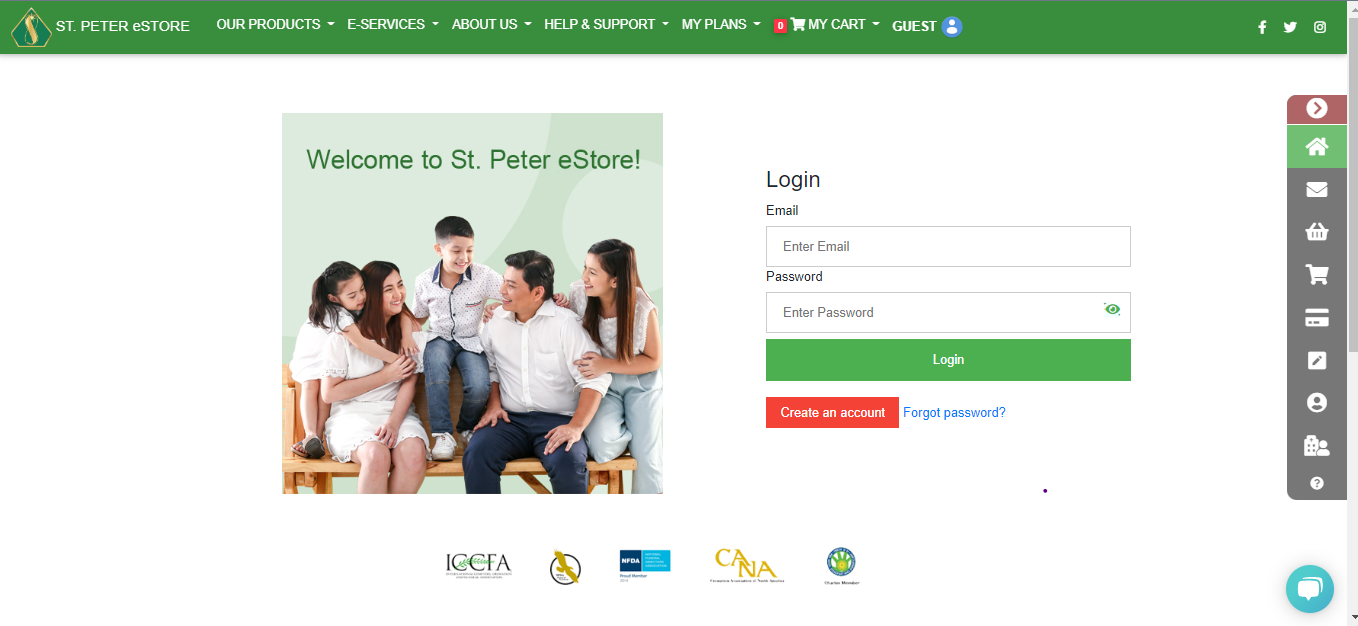 2. From MY ACCOUNT select REQUEST PLAN DOCUMENTS.
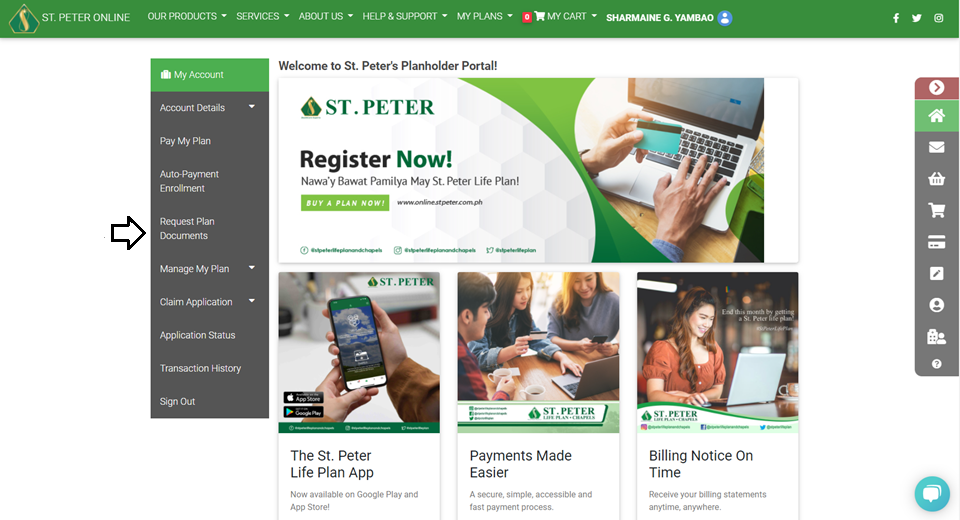 3. SELECT THE PLAN for which you want to request a document. (Only plans purchased from the St. Peter eStore will appear.)
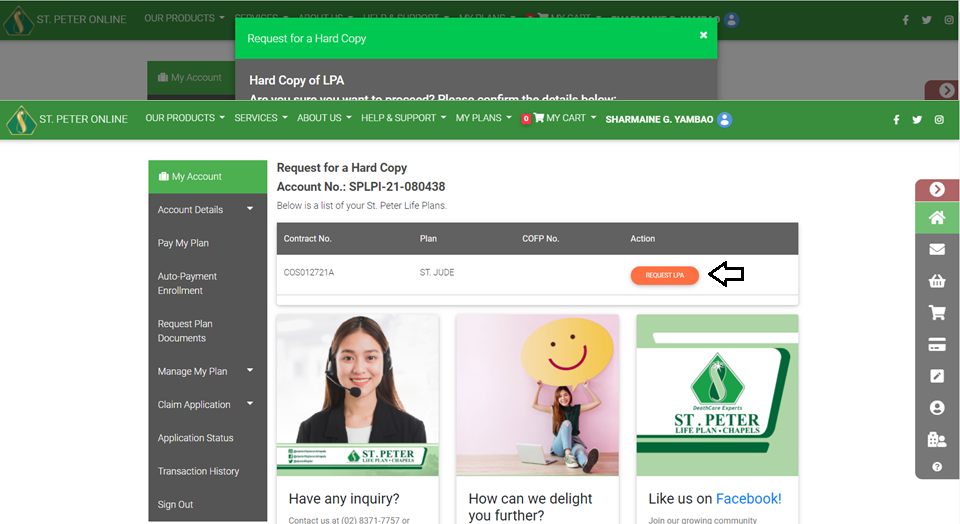 4. Click the document that you wish to request and review your account details.
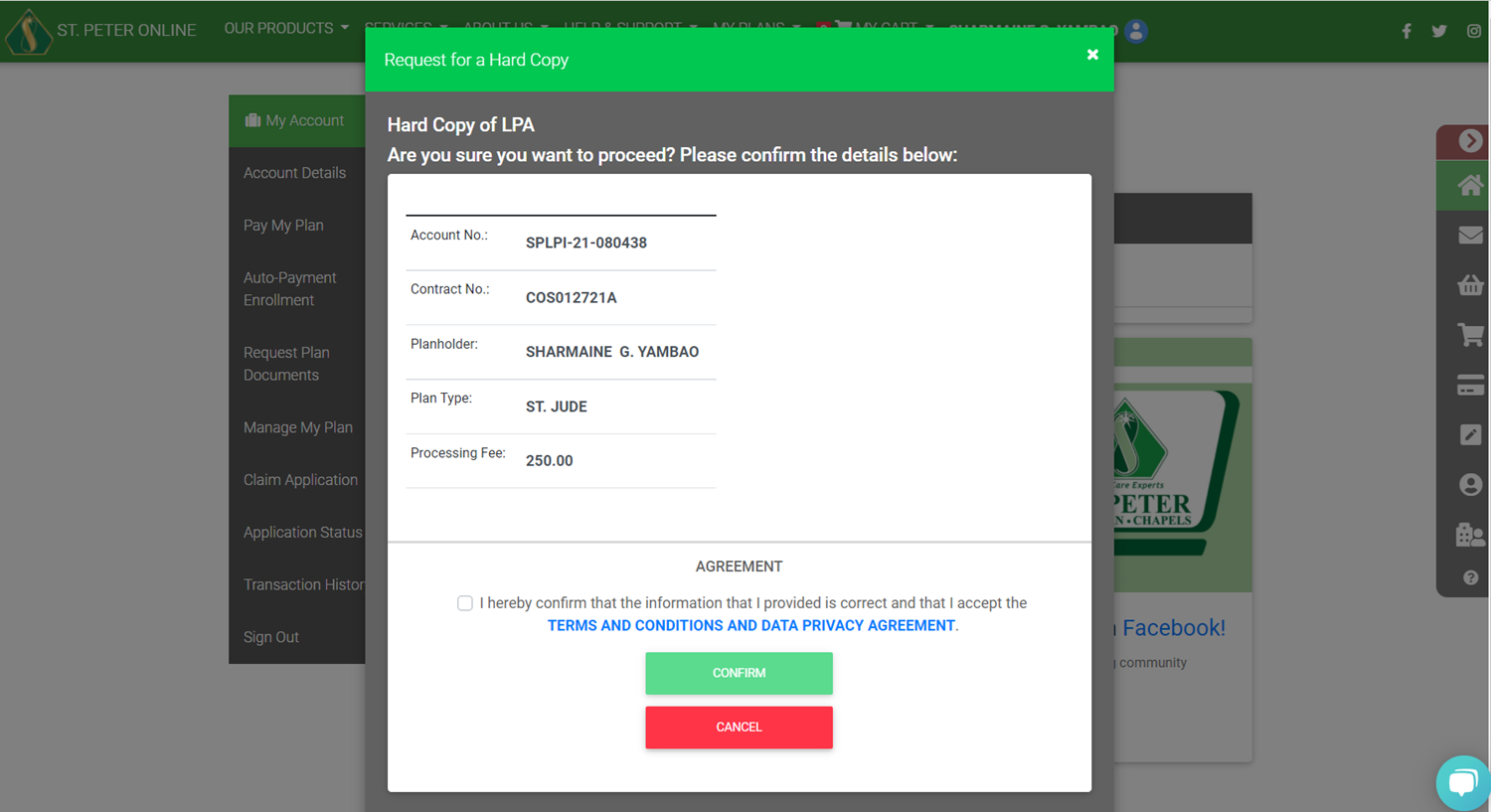 5. Tick the check box to agree to the Terms & Conditions then click CONFIRM.
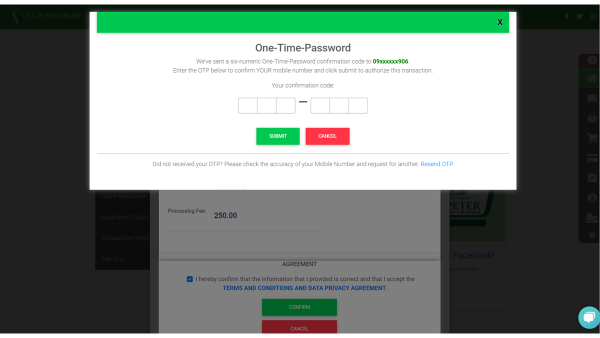
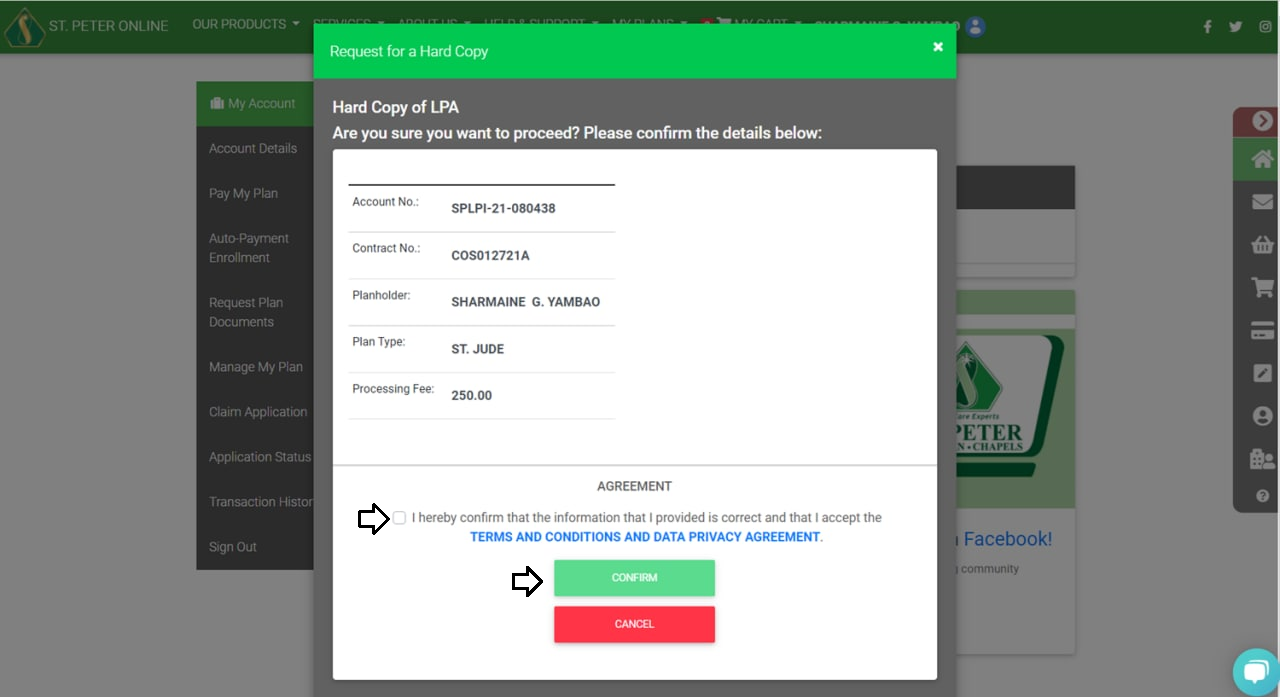 6. Enter the One-Time-Password (OTP) then click SUBMIT.
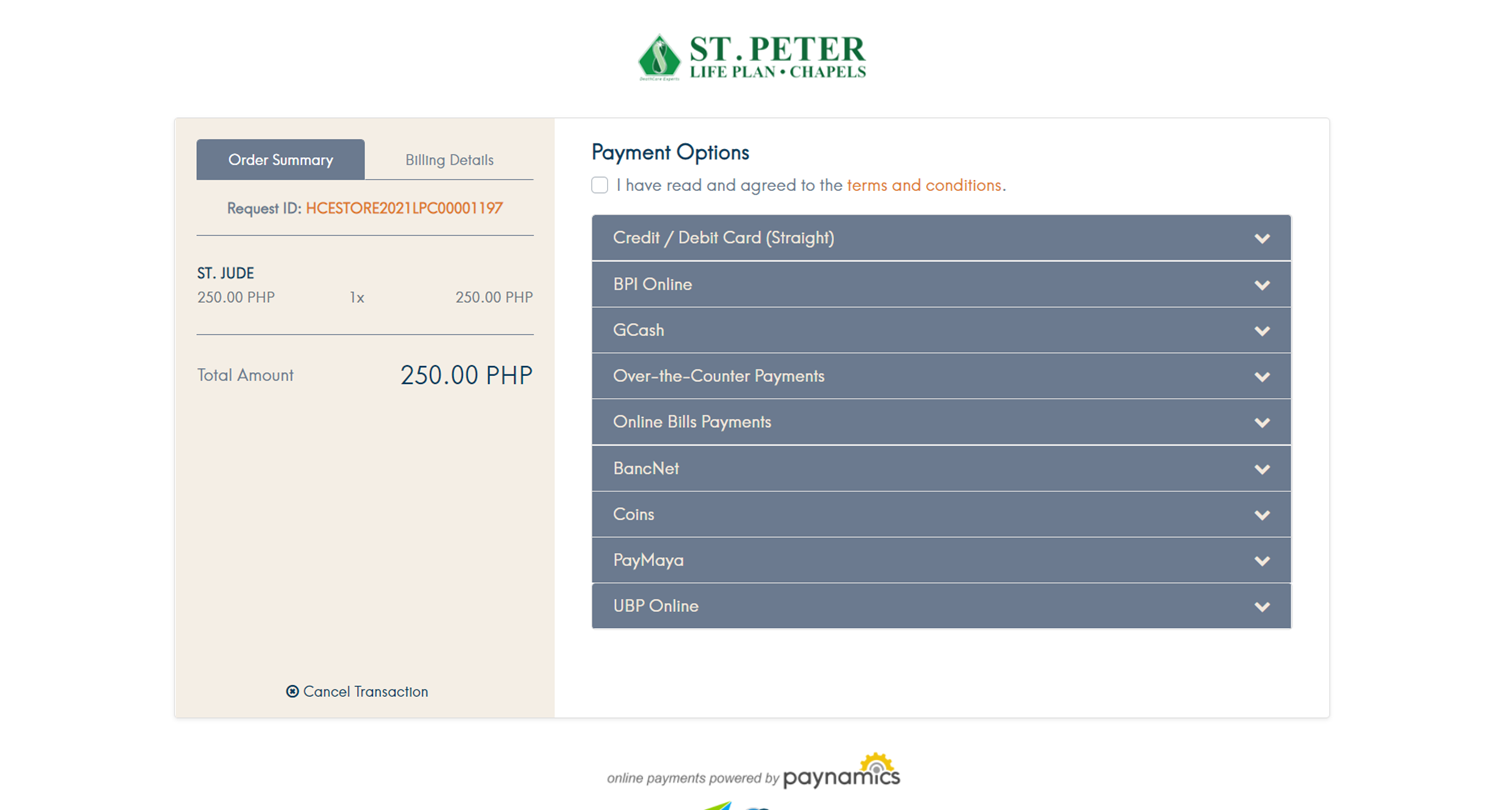
 7. Pay the transaction fee using your preferred payment method.
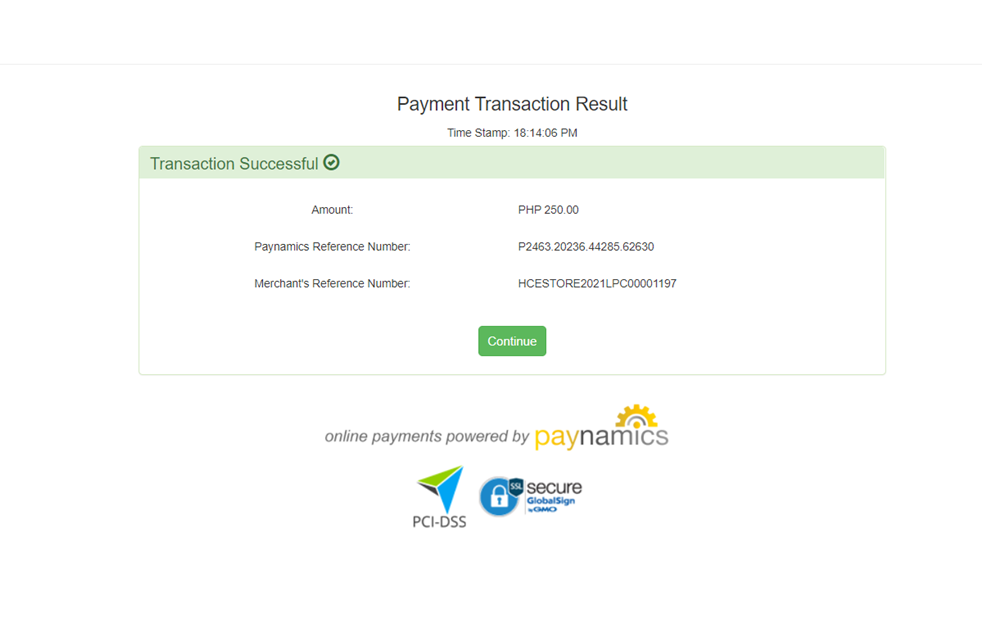
 8. Payment confirmation details and the status of the request will be sent to your registered email address.
2. From MY ACCOUNT select REQUEST PLAN DOCUMENTS.
3. SELECT THE PLAN for which you want to request a document. (Only plans purchased from the St. Peter eStore will appear.)
4. Click the document that you wish to request and review your account details.
5. Tick the check box to agree to the Terms & Conditions then click CONFIRM.
6. Enter the One-Time-Password (OTP) then click SUBMIT.
7. Pay the transaction fee using your preferred payment method.
8. Payment confirmation details and the status of the request will be sent to your registered email address.
I forgot my password. What should I do?
1. Go to the log-in page https://online.stpeter.com.ph/Login/LogInAccount 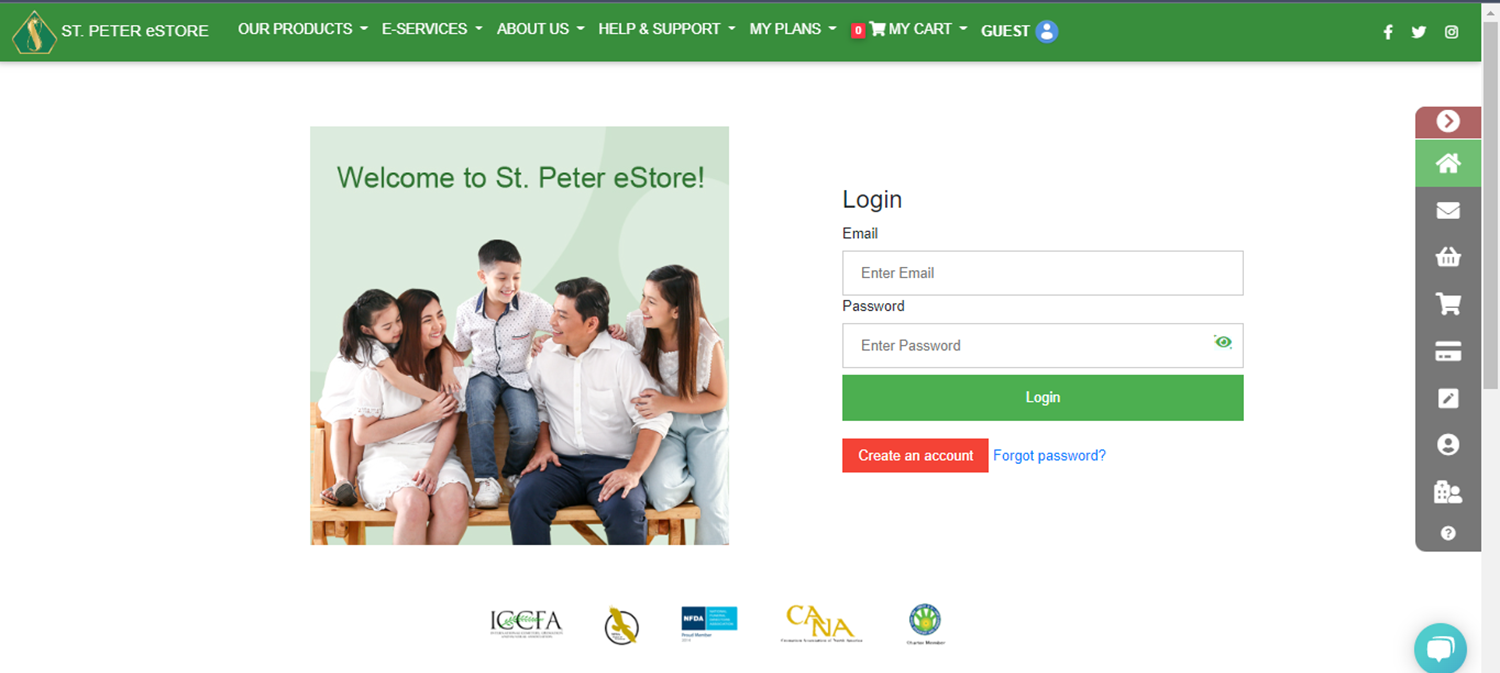 2. Click FORGOT PASSWORD.
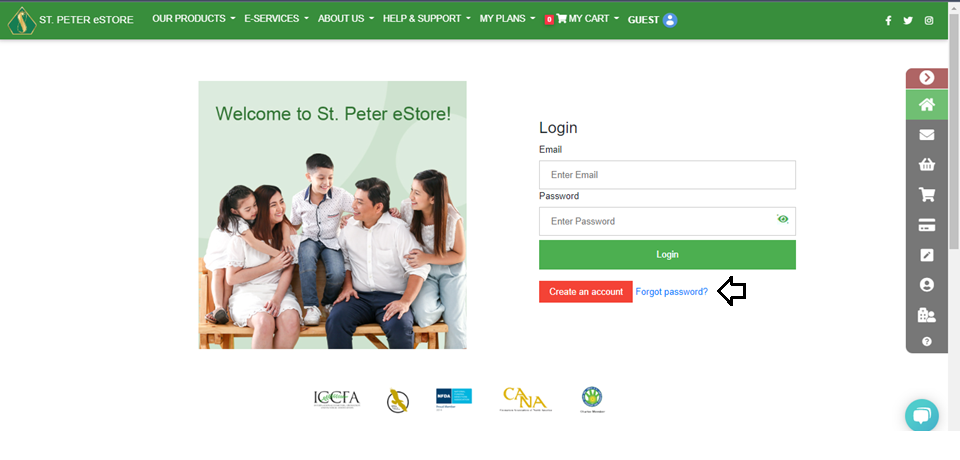 3. Type in your email address then click Next.
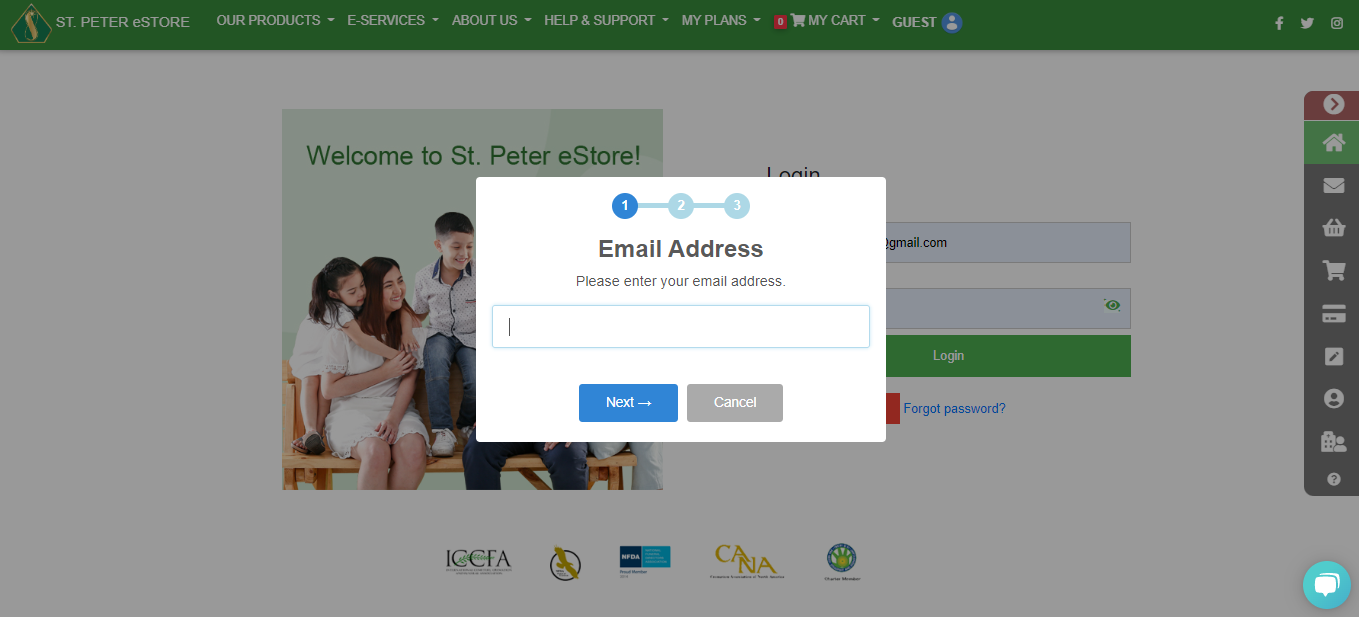 4. Type in your mobile number and you will receive an OTP.
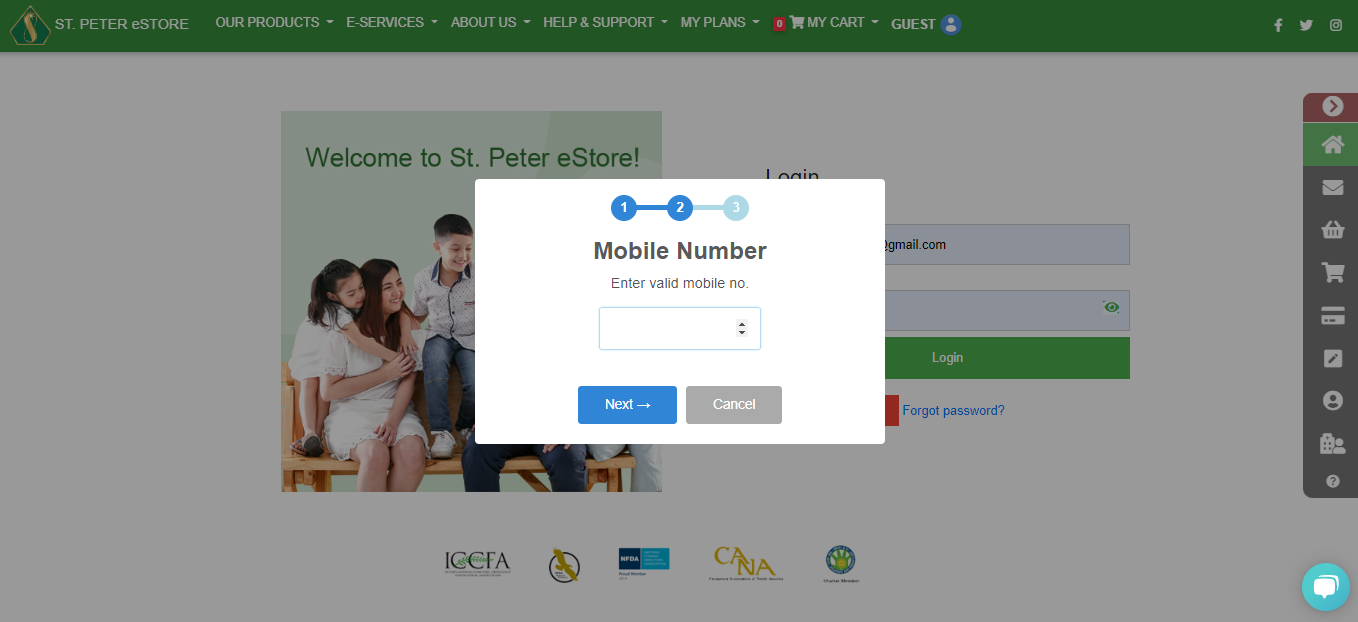 5. You will receive an email including your temporary password. Log in to your account and change the password on the profile settings.
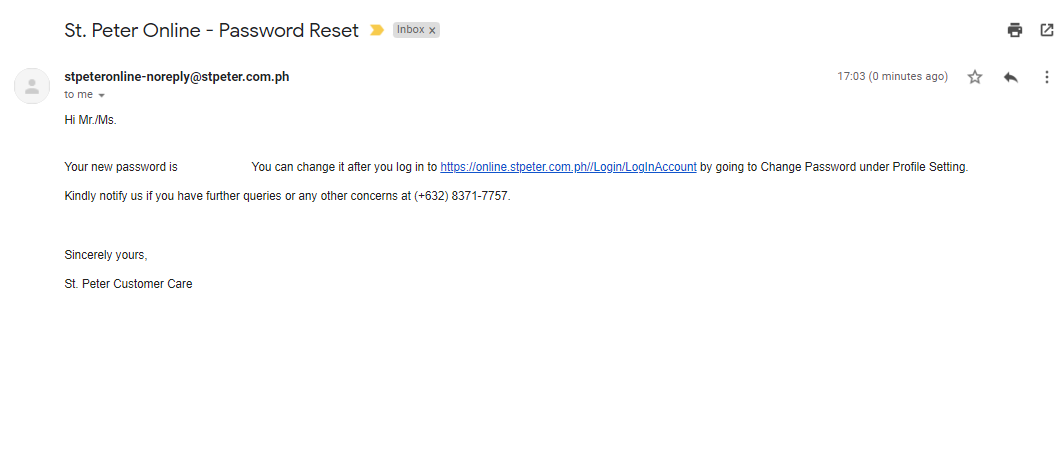
2. Click FORGOT PASSWORD.
3. Type in your email address then click Next.
4. Type in your mobile number and you will receive an OTP.
5. You will receive an email including your temporary password. Log in to your account and change the password on the profile settings.
How can I reset my password?
1. Log in to your account.
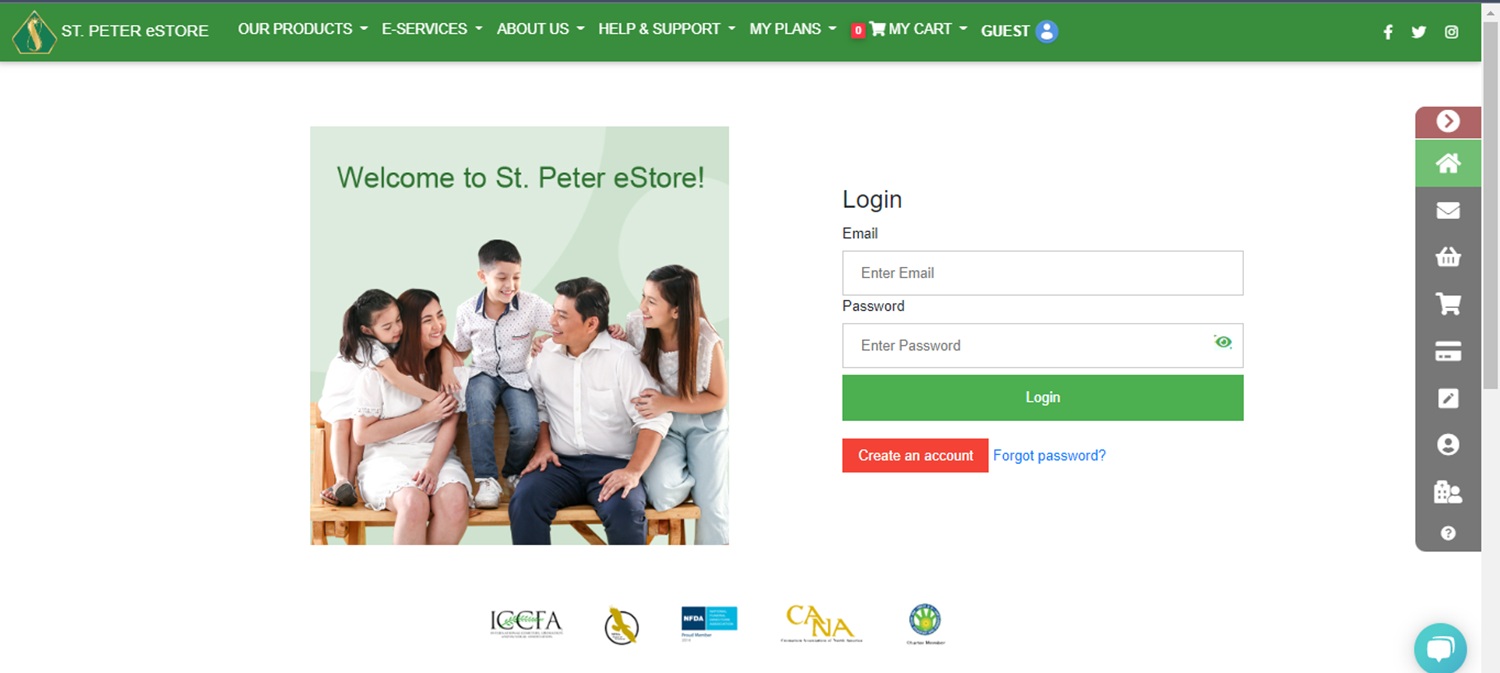 2. Go to Account Details and select PROFILE. On the User Profile, click the CHANGE PASSWORD.
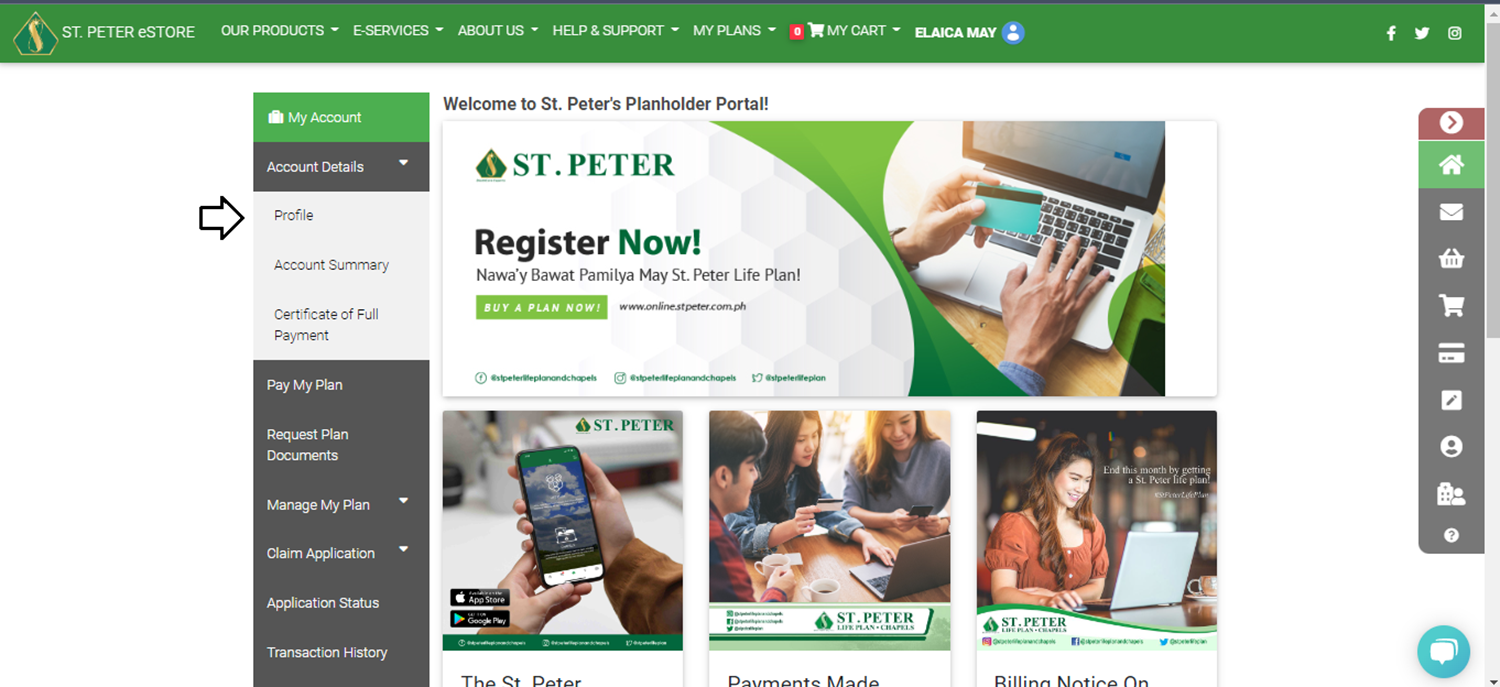 3. Enter your current password and then enter your new password.
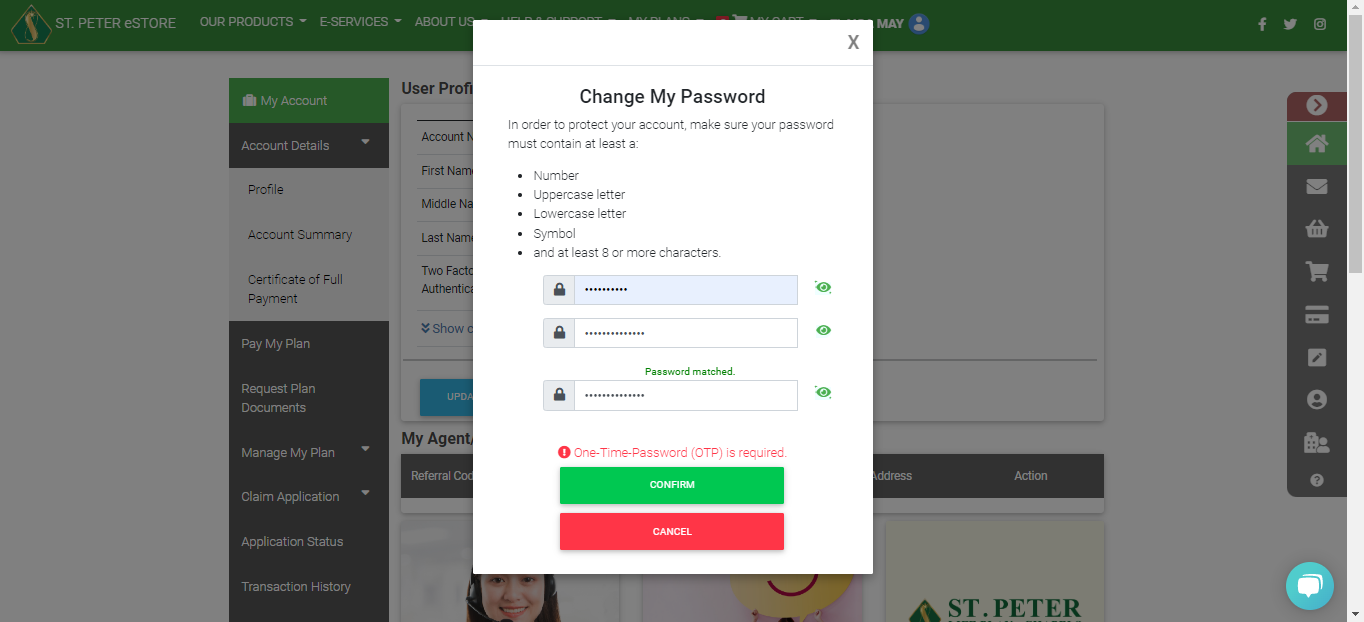 4. Tap CONFIRM and you will receive an OTP to your registered mobile number.
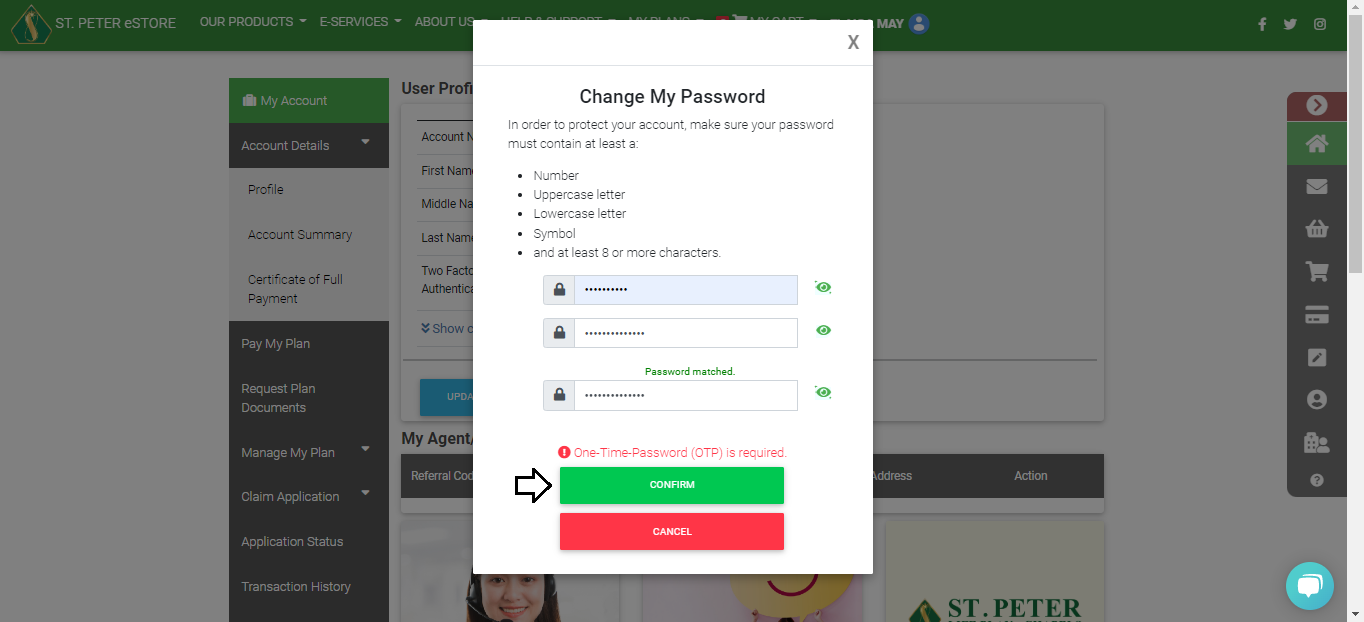 5. Enter the OTP and Submit.
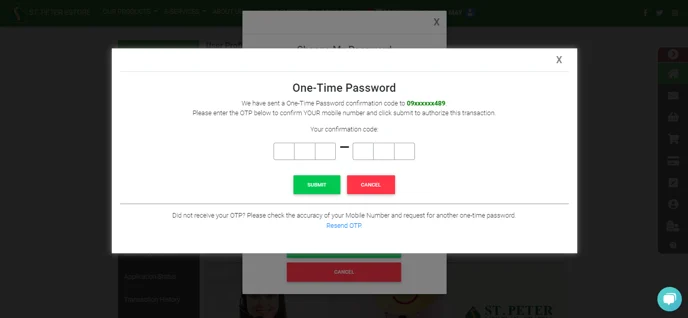
2. Go to Account Details and select PROFILE. On the User Profile, click the CHANGE PASSWORD.
3. Enter your current password and then enter your new password.
4. Tap CONFIRM and you will receive an OTP to your registered mobile number.
5. Enter the OTP and Submit.
I no longer have my registered mobile number. How can I log in?
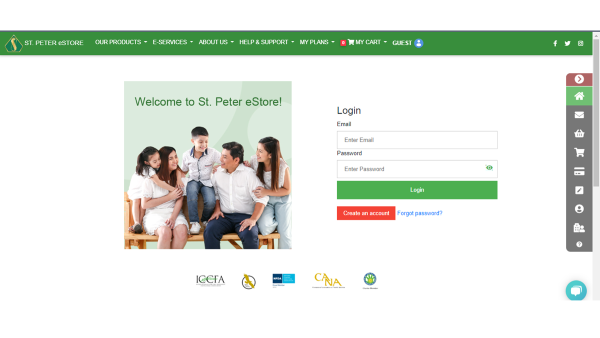
1. Log in to your account.
 2. Go to Account Details and select PROFILE. On the user profile page, click SHOW CONTACT INFO.
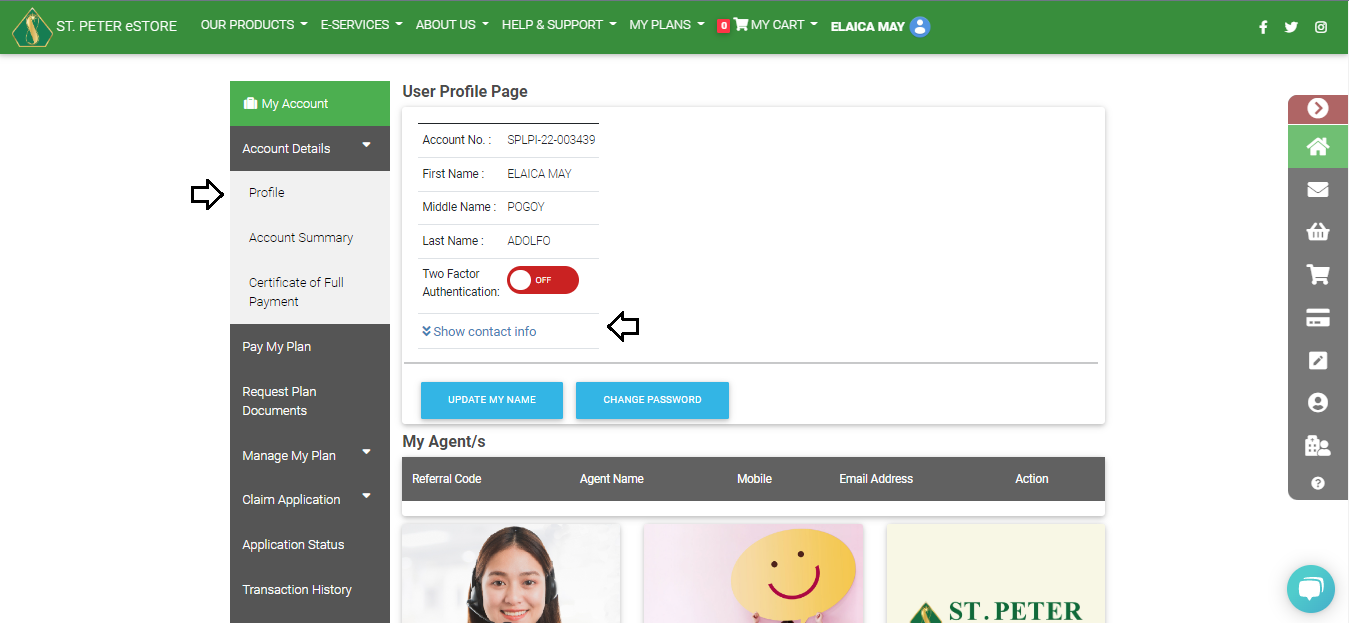 3. Click CHANGE on the mobile number and complete the following steps:
Enter your current password and new mobile number.
Verify the code sent to your email.
Enter the OTP sent to your new mobile number.
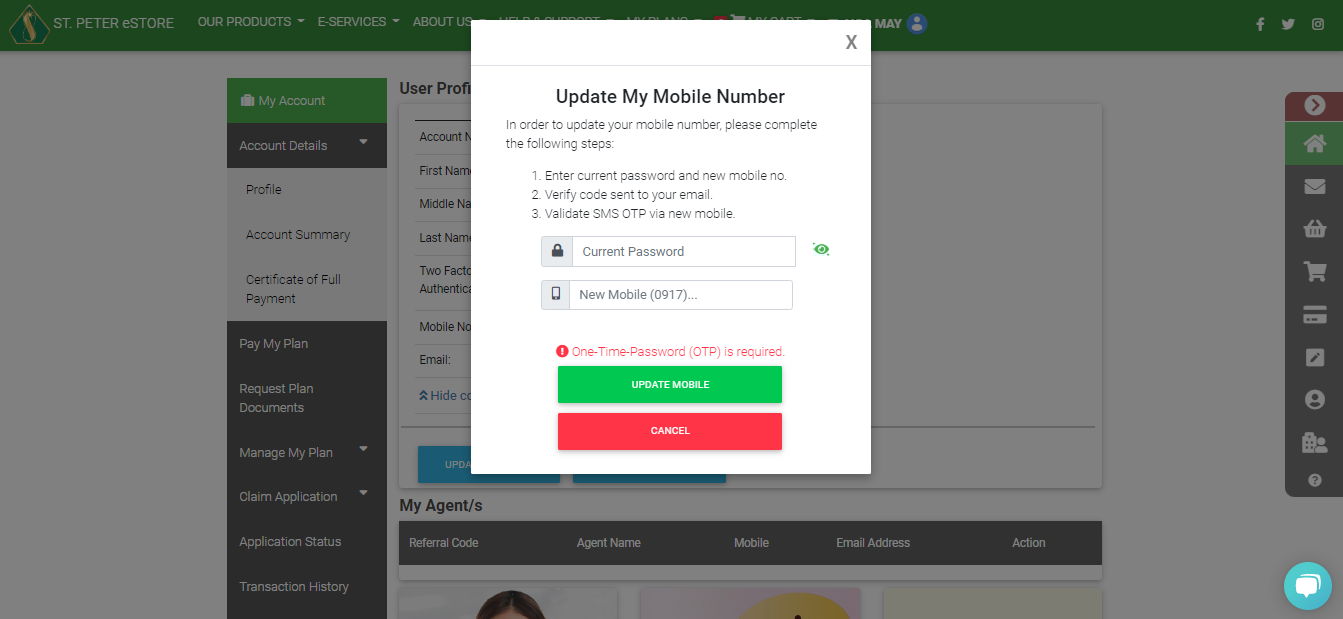 For accounts with Two-Factor Authentication, please contact us for immediate assistance.
2. Go to Account Details and select PROFILE. On the user profile page, click SHOW CONTACT INFO.
3. Click CHANGE on the mobile number and complete the following steps:
Enter your current password and new mobile number.
Verify the code sent to your email.
Enter the OTP sent to your new mobile number.
For accounts with Two-Factor Authentication, please contact us for immediate assistance.
What do you mean by the 15-day free-look period?
It is the time given to planholders to read the plans terms and conditions and assess if he or she has made the right purchase.
Within the free-look period, the planholder can request for cancellation of the plan and be entitled to a full refund of the paid amount. The refund will be credited to the planholder within 7 business days upon receipt of the cancellation request except for payments made thru Mastercard or Visa debit/credit cards, which will be credited back to the debit/credit card used for purchase within 15 business days. If the plan was paid using online banking, the refund will be in the form of a check payable to the planholder.
Can I still cancel my plan on eStore after the 15-day free look period?
The amount that you will receive upon termination will now be based on the plan termination value schedule.
If the plan was purchased through the St. Peter eStore and is beyond the 15-day free look period, you may submit your request for plan termination online through your St. Peter Online Store account.
You can follow these steps to proceed with your online plan termination:
1. Just log in with your account details at www.online.stpeter.com.ph and click on the CANCELLATION TAB to begin your application.
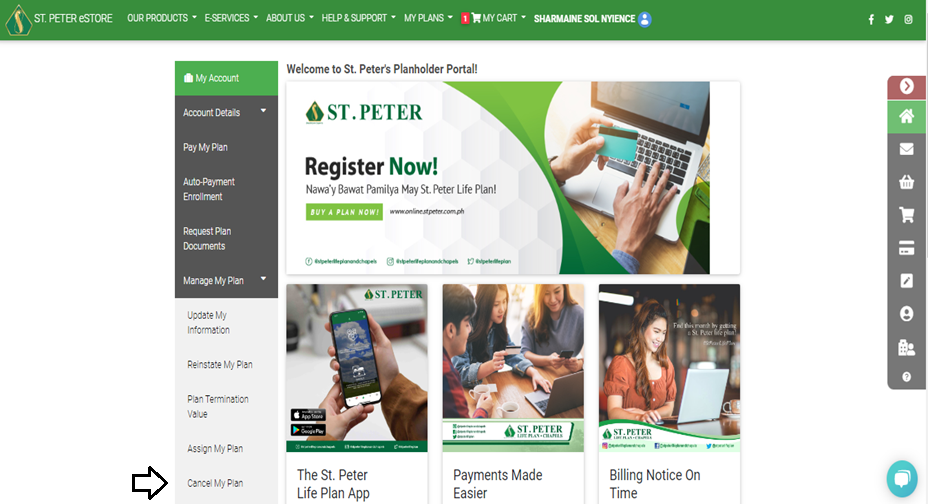 2. Select the plan you wish to terminate.
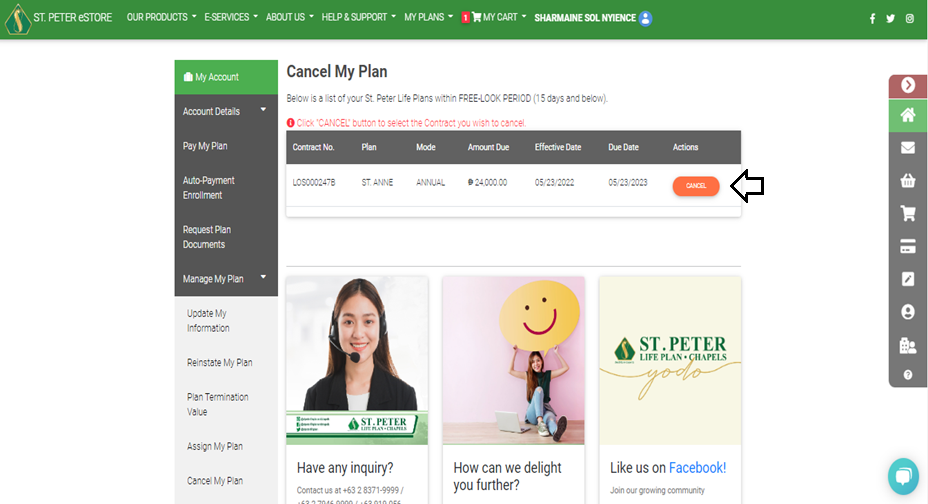 3. Upon confirmation of the plan you wish to cancel, you will receive an OTP on your registered mobile number.
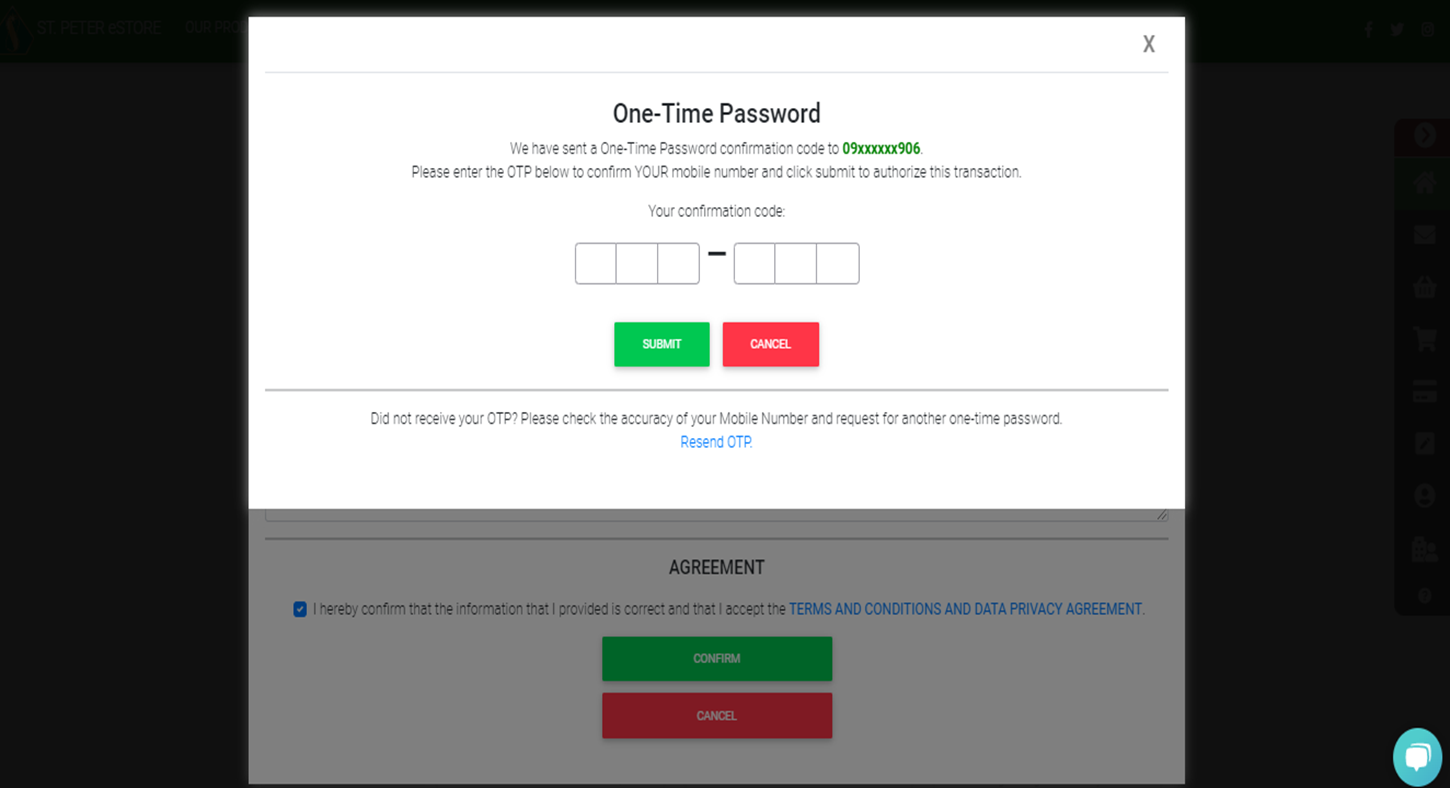 Please make sure that you have the mobile phone that you used to register ready in order to receive the OTP. Upon verifying your OTP, you are also agreeing to proceed with the cancellation of your plan.
Kindly take note that once the plan is terminated, all applicable features and benefits of the plan will also be terminated and that the plan may no longer be used for memorial service.
2. Select the plan you wish to terminate.
3. Upon confirmation of the plan you wish to cancel, you will receive an OTP on your registered mobile number.
Please make sure that you have the mobile phone that you used to register ready in order to receive the OTP. Upon verifying your OTP, you are also agreeing to proceed with the cancellation of your plan.
Kindly take note that once the plan is terminated, all applicable features and benefits of the plan will also be terminated and that the plan may no longer be used for memorial service.
How can I enroll my plan for auto-payment?
1. Sign in to your St. Peter eStore account.
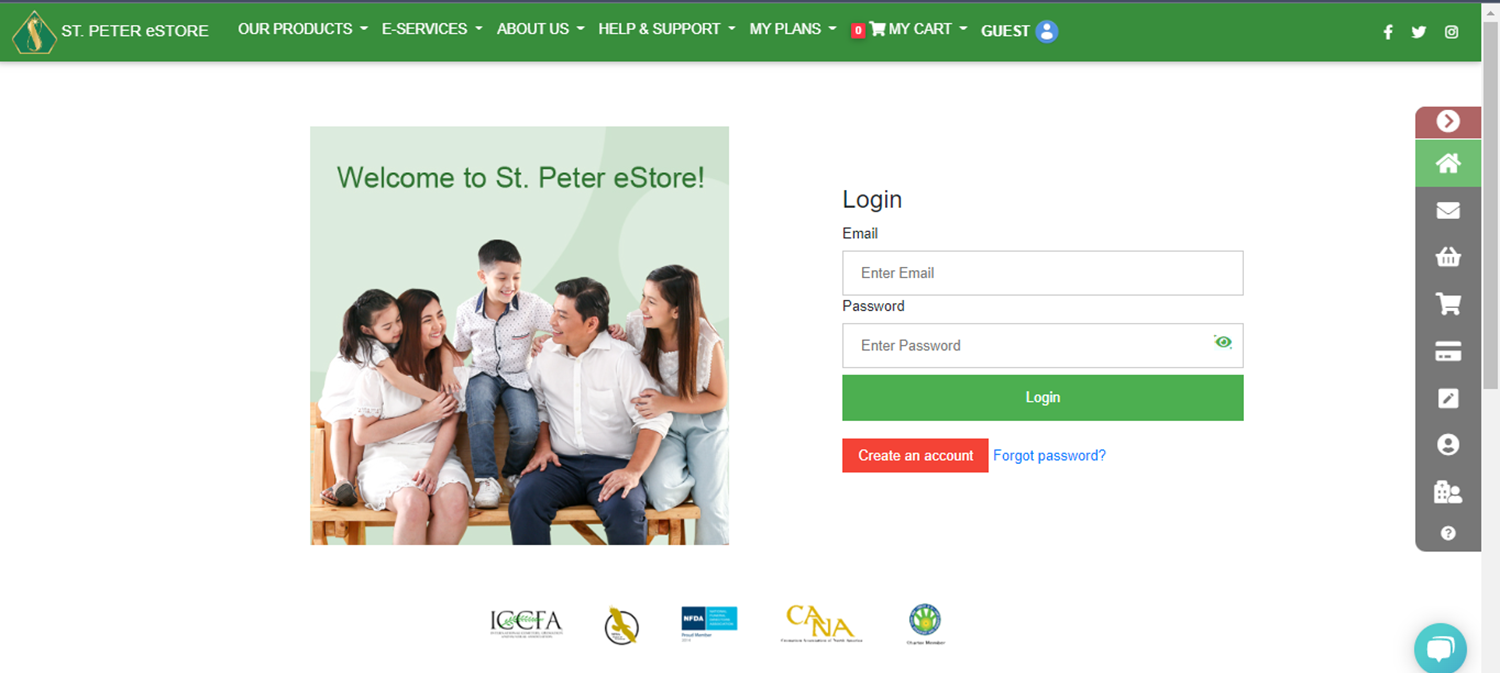 2. Select the Auto-payment enrollment option.
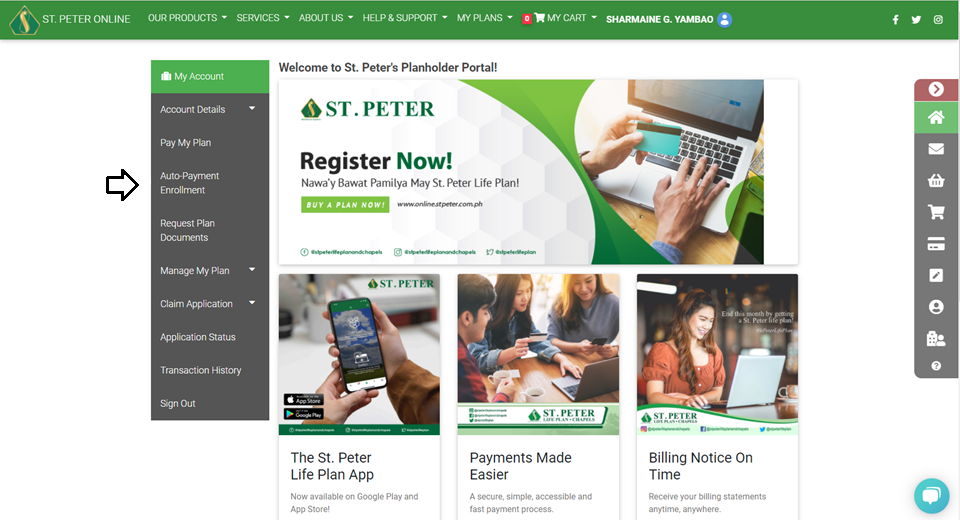 3. Select the contract number that you want to enroll for auto-payment.
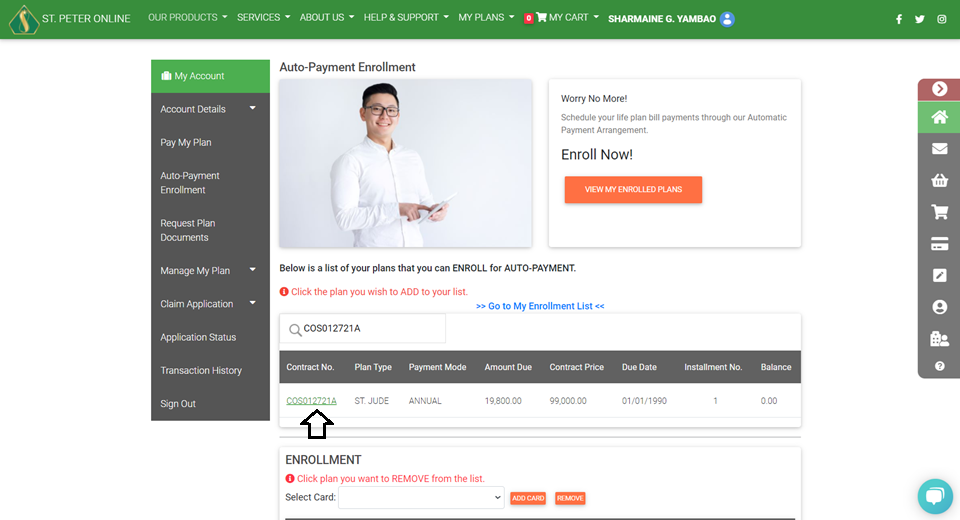 4. Click Add card then fill in the card information.
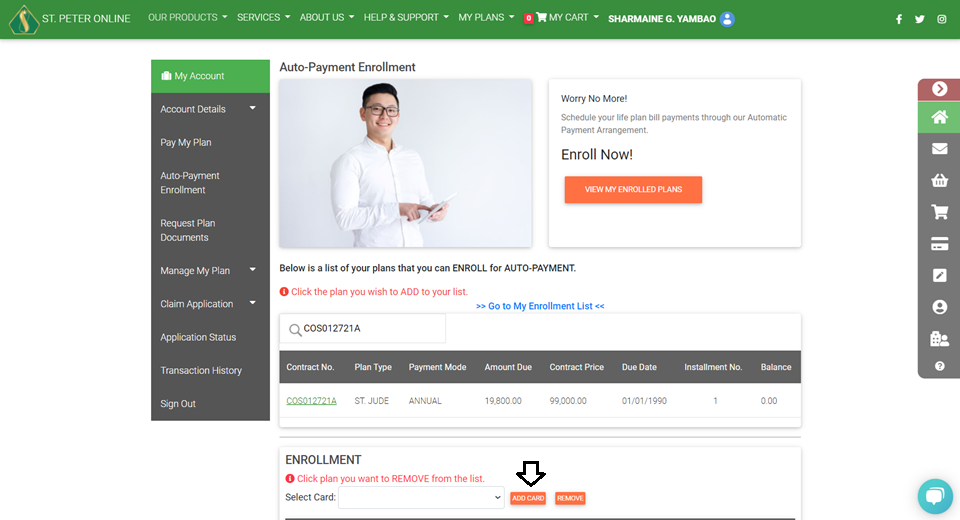 5. Fill out the necessary information, then click ADD CARD.
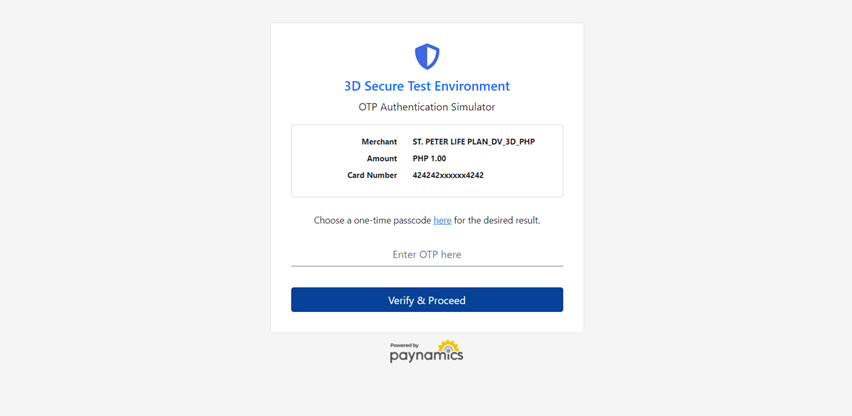
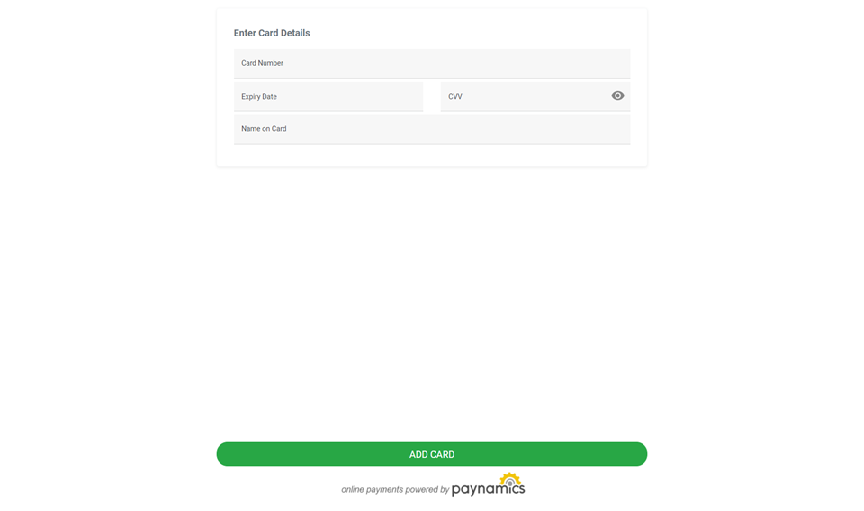 6. Enter OTP then click VERIFY and PROCEED.
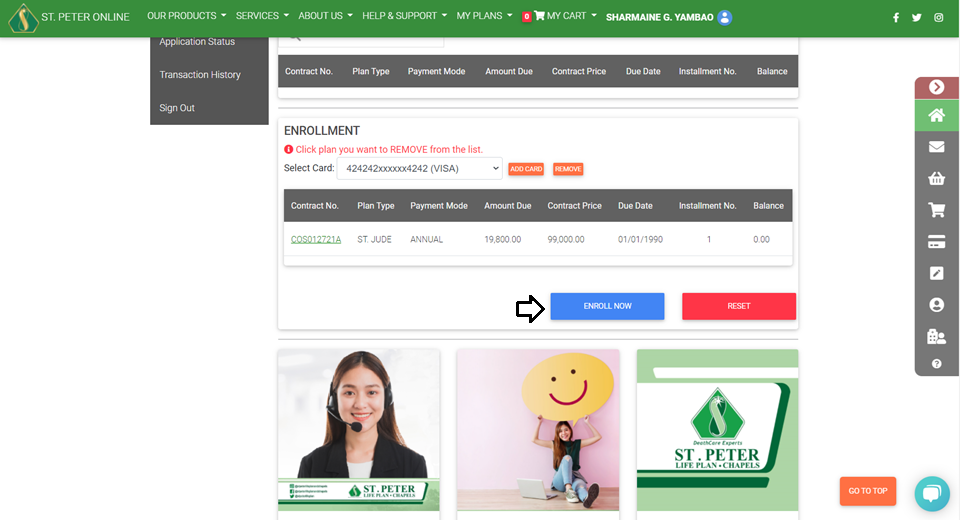
 7. Click the Enroll Now button.
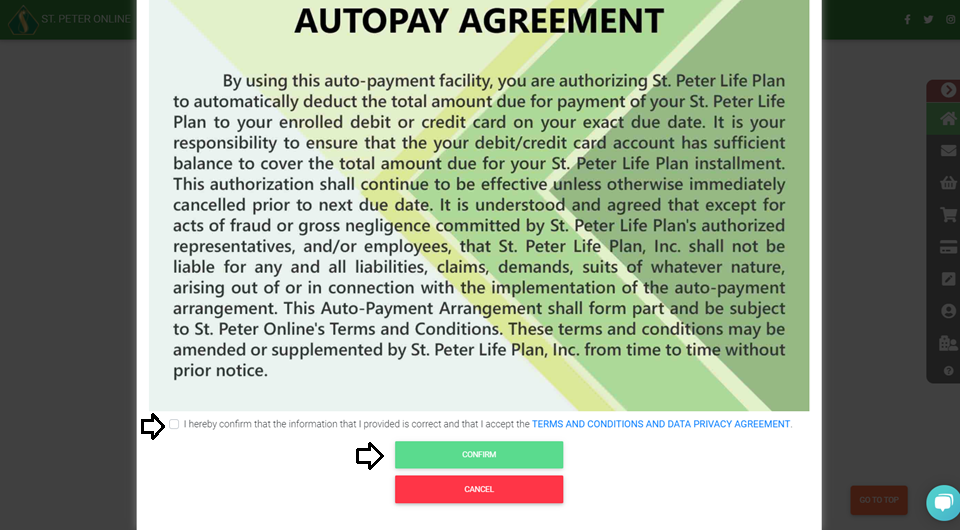
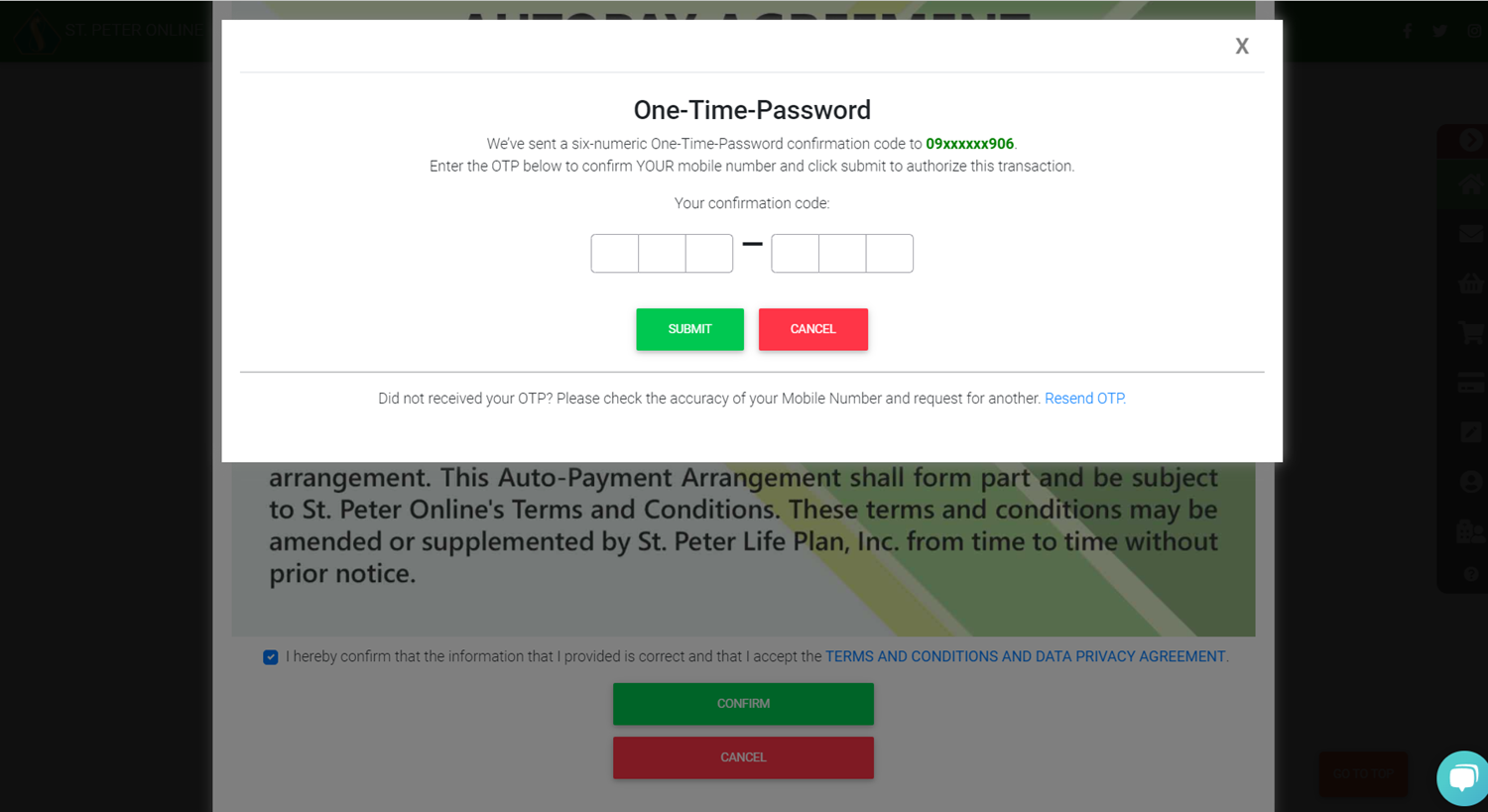
 8. Check the Autopay Agreement box, then click Confirm.
 9. Enter the 6-digit OTP sent to your registered mobile number and click Submit.
 The credit card that will be used for auto-payment must first be used at least once for payment on the St. Peter eStore before it can be registered in the auto-payment facility.
2. Select the Auto-payment enrollment option.
3. Select the contract number that you want to enroll for auto-payment.
4. Click Add card then fill in the card information.
5. Fill out the necessary information, then click ADD CARD.
6. Enter OTP then click VERIFY and PROCEED.
7. Click the Enroll Now button.
8. Check the Autopay Agreement box, then click Confirm.
9. Enter the 6-digit OTP sent to your registered mobile number and click Submit.
The credit card that will be used for auto-payment must first be used at least once for payment on the St. Peter eStore before it can be registered in the auto-payment facility.
How to reinstate the plan availed through eStore?
To continue with the plan, a request for Reinstatement must be submitted. Please follow the steps below to apply for reinstatement of your plan:
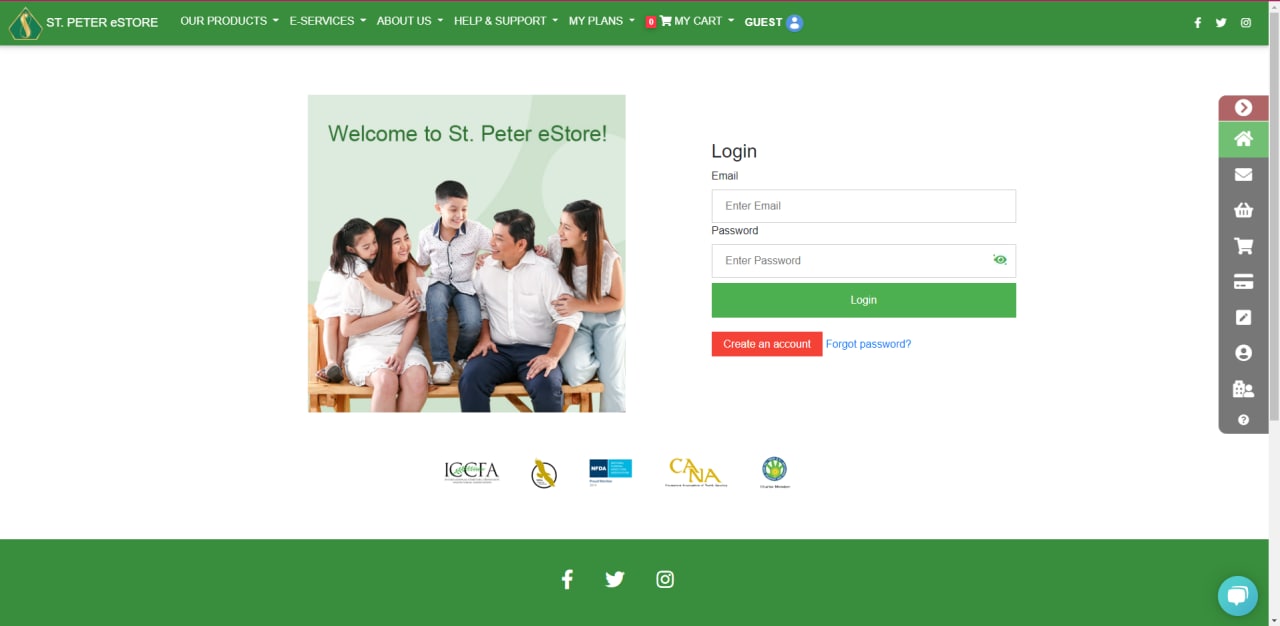
1. Please log in to your eStore account at online.stpeter.com.ph.
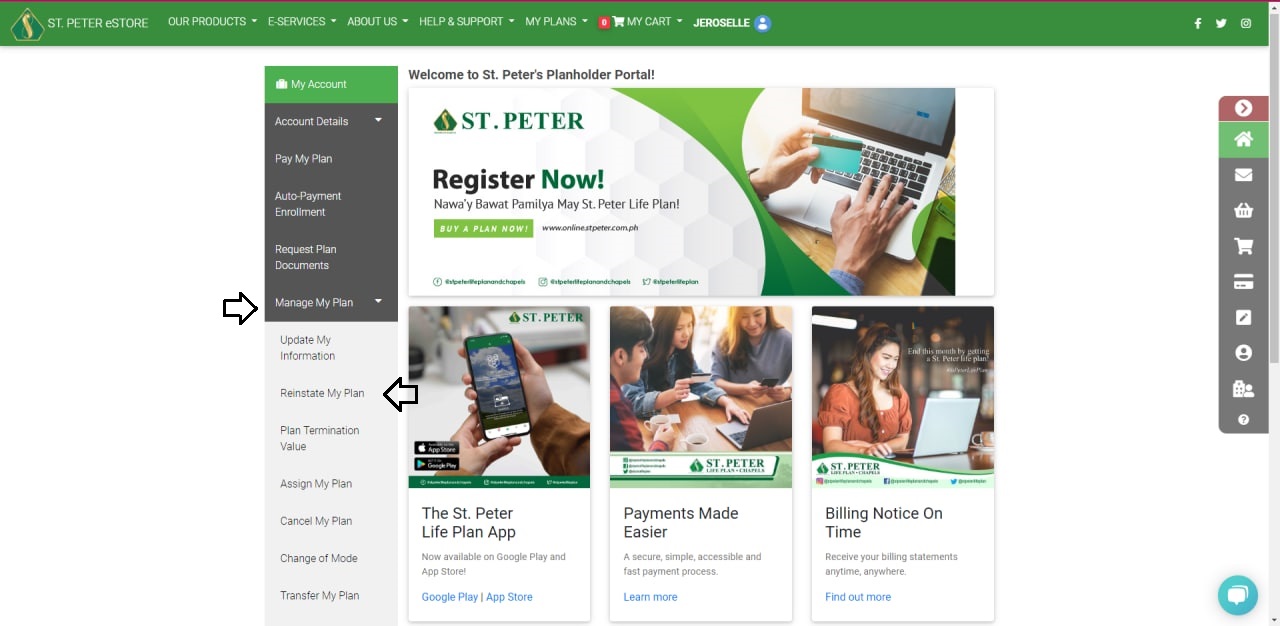
 2. Then, under MANAGE MY PLAN, select REINSTATE MY PLAN.
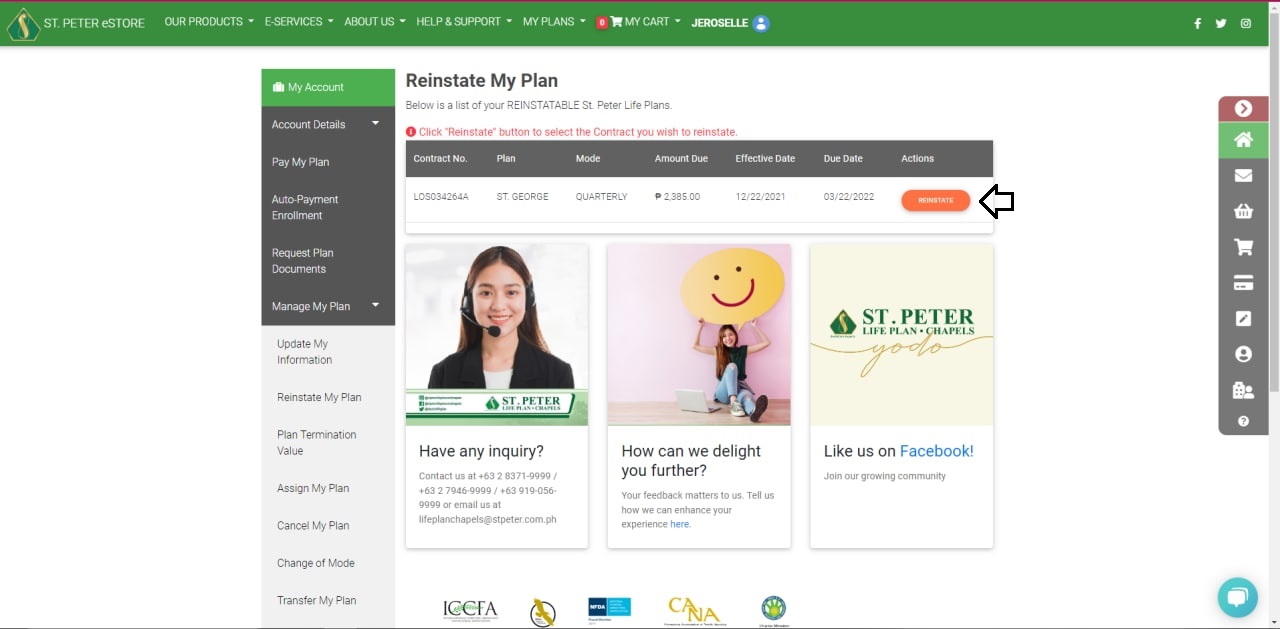
 3. Click the REINSTATE button after selecting the contract number you want to reinstate.
 4. Review your plan details and choose your payment method (If you want to continue your plan in installments, click INSTALLMENT, or if you're going to pay the balance, click PAY THE BALANCE.)
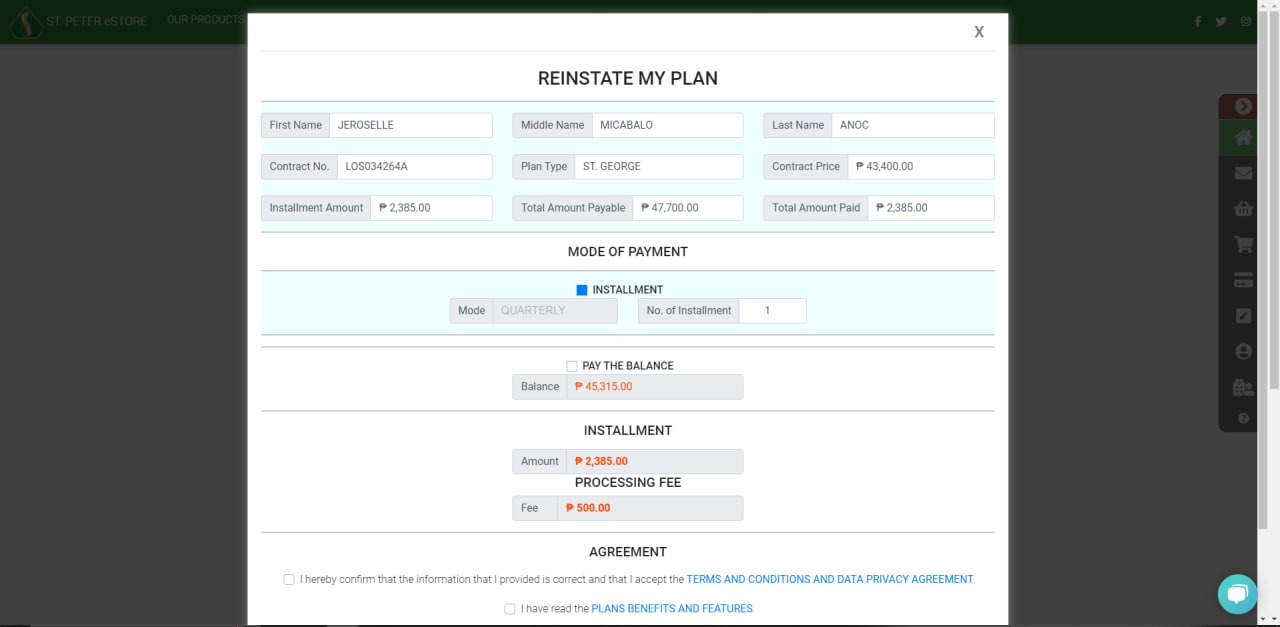 5. Check the boxes next to Terms and Conditions, Data Privacy Agreement, Plan Benefits, and Features, and then click CONFIRM.
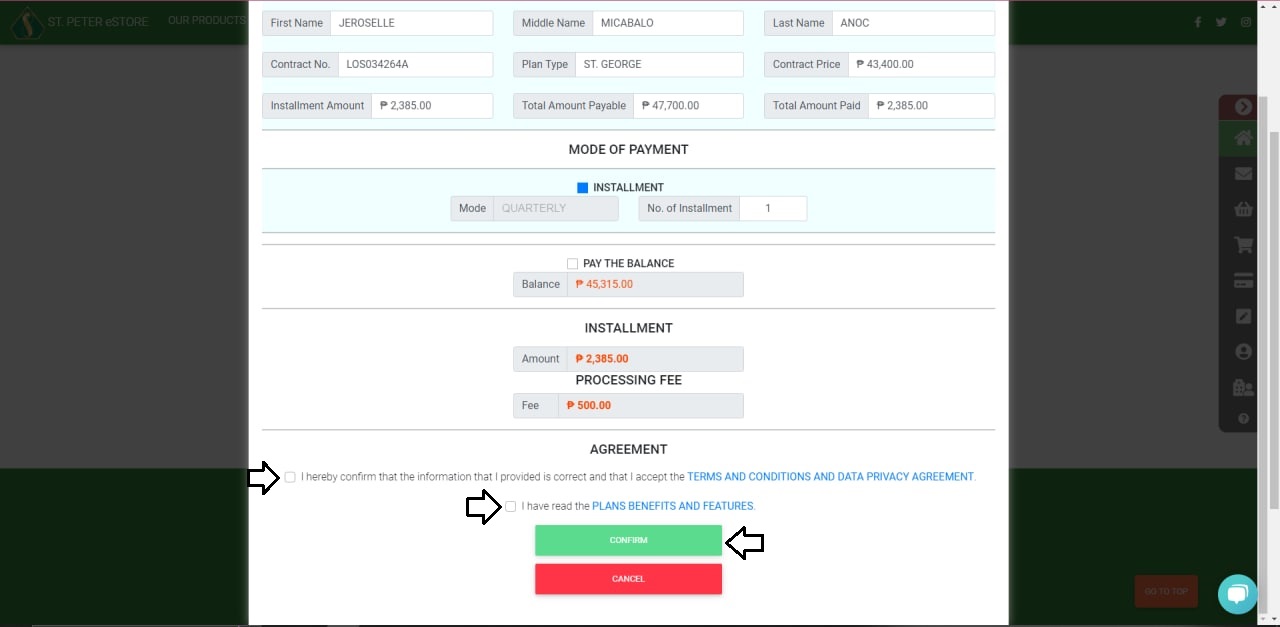 6. You'll be redirected to the Life Plan Application page, where you can review the planholder's information. Please check the boxes that correspond to your health condition in the HEALTH DECLARATION section.
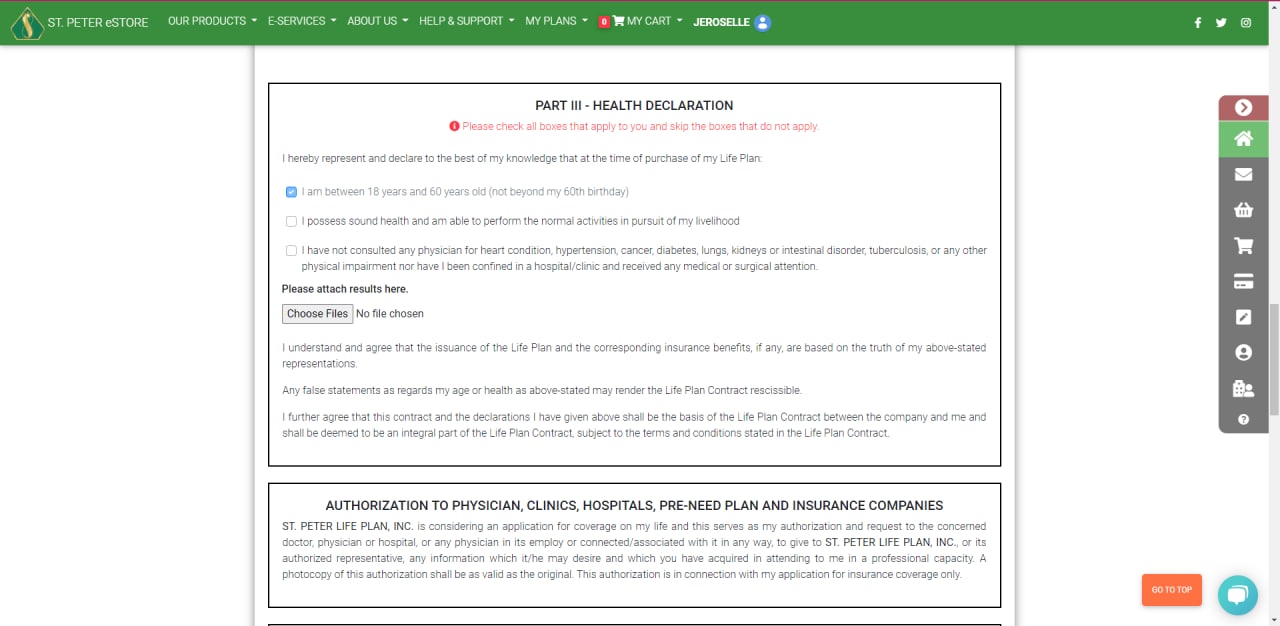 7. On the ONLINE PURCHASE AUTHENTICATION section, please submit a copy of your Valid ID and three specimen signatures, then click PROCEED.
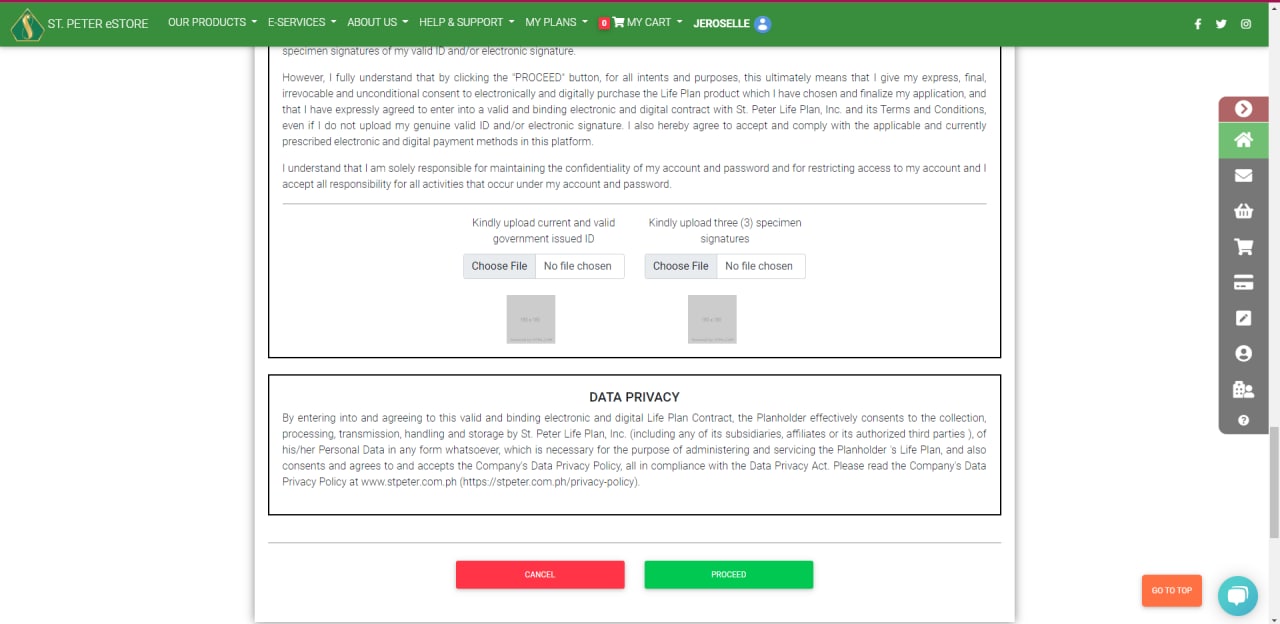 8. Please double-check your information and click the three boxes in the CONFIRMATION section before clicking CONFIRM.
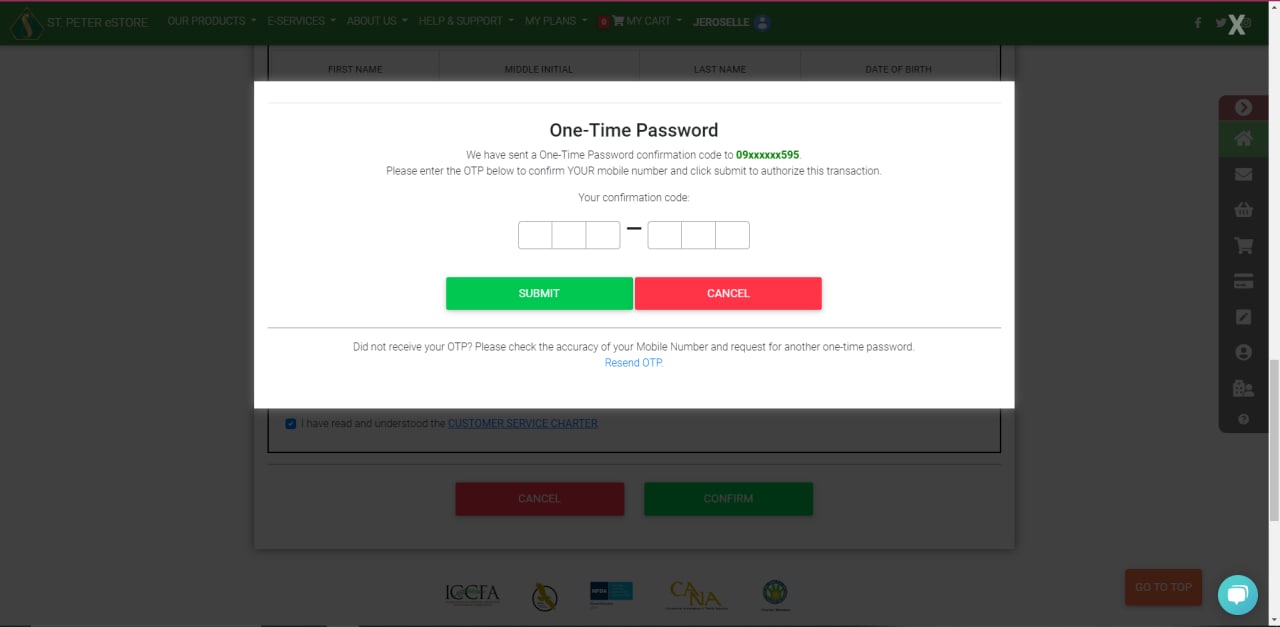
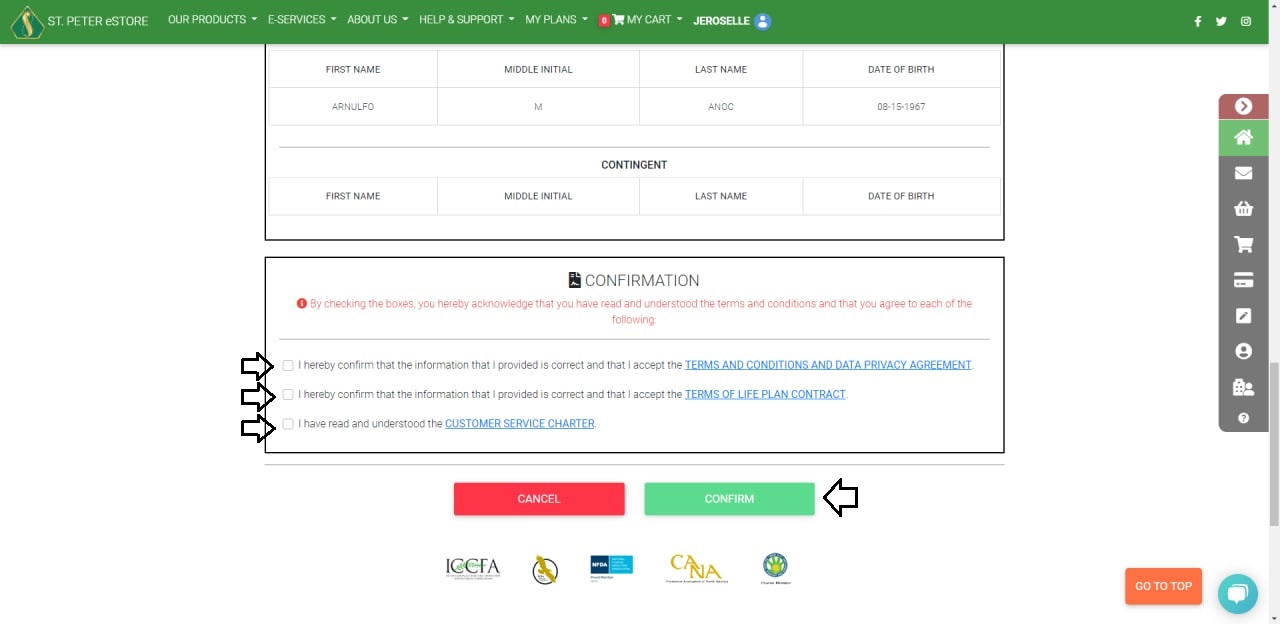 9. Fill in the 6-digit One-Time Password that was sent to your registered cellphone number.
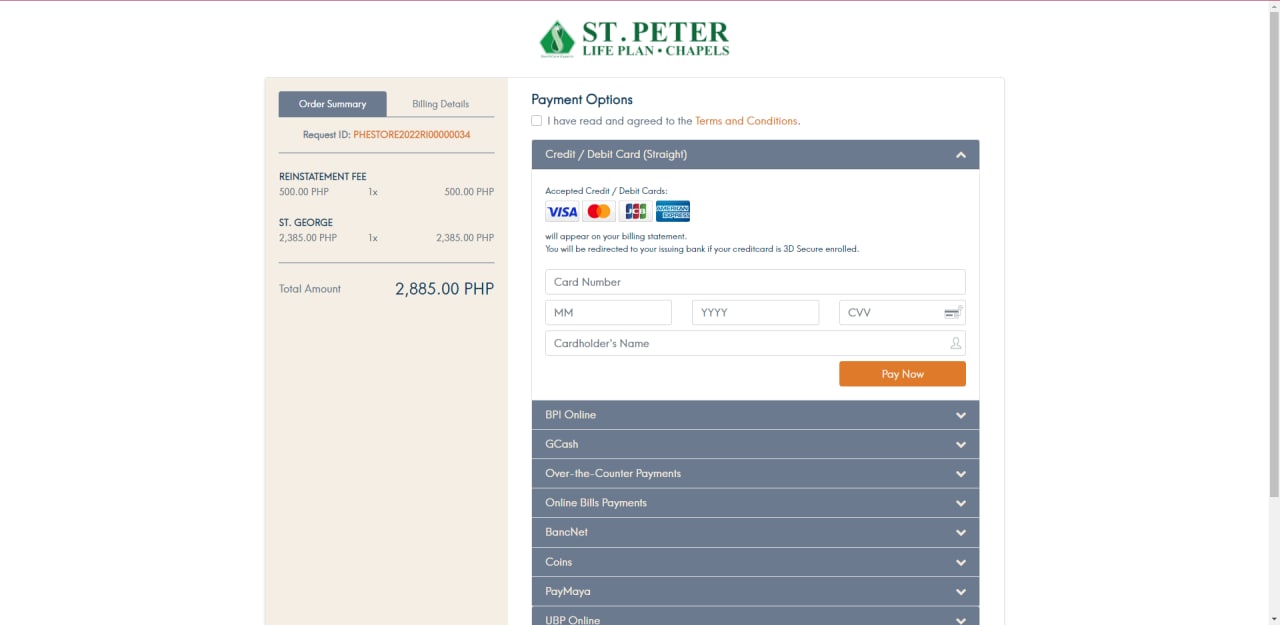
 10. You'll be redirected to the Payment page. You can pay with a credit card, debit card, online banking, e-wallets, or non-bank over-the-counter options such as 7-11 and MLhuiller.
 You may also check the status of your plan on the Account Summary page, as well as your e-mail address for a Welcome Letter confirming your plan reinstatement.
2. Then, under MANAGE MY PLAN, select REINSTATE MY PLAN.
3. Click the REINSTATE button after selecting the contract number you want to reinstate.
4. Review your plan details and choose your payment method (If you want to continue your plan in installments, click INSTALLMENT, or if you're going to pay the balance, click PAY THE BALANCE.)
5. Check the boxes next to Terms and Conditions, Data Privacy Agreement, Plan Benefits, and Features, and then click CONFIRM.
6. You'll be redirected to the Life Plan Application page, where you can review the planholder's information. Please check the boxes that correspond to your health condition in the HEALTH DECLARATION section.
7. On the ONLINE PURCHASE AUTHENTICATION section, please submit a copy of your Valid ID and three specimen signatures, then click PROCEED.
8. Please double-check your information and click the three boxes in the CONFIRMATION section before clicking CONFIRM.
9. Fill in the 6-digit One-Time Password that was sent to your registered cellphone number.
10. You'll be redirected to the Payment page. You can pay with a credit card, debit card, online banking, e-wallets, or non-bank over-the-counter options such as 7-11 and MLhuiller.
You may also check the status of your plan on the Account Summary page, as well as your e-mail address for a Welcome Letter confirming your plan reinstatement.
How do I remove my Auto Payment Enrollment?
1. Log In: Go to St. Peter Online Portal and log in to your account.
2. Access Enrollment: Under the "Planholder Portal," click on "Auto-Payment Enrollment." Then, select "VIEW MY ENROLLED PLANS," which is an orange button located at the upper right corner. A page will display your enrolled plans.
3. Select Plan: Choose the LPANo (Life Plan Account Number) for the plan you wish to remove. A pop-up window will appear; click "DEACTIVATE AUTO PAYMENT."
4. Check Enrollments: Ensure that no plans are currently enrolled to proceed with the removal of the linked card.
5. Return to Enrollment Page: Go back to the Auto-Payment Enrollment page and find the "ENROLLMENT" section.
6. Remove Card: Click the "REMOVE" button next to the linked card to complete the process.
Note: For your convenience, we have attached a file containing screenshots of the process for reference.
What is a memorial plan?
Memorial Plans are Pre-Need plans which provide for the performance of future memorial service/s, payment of monetary considerations, or delivery of other benefits at the time of actual need or agreed maturity date. These plans are paid in cash or installment amounts with or without interest or insurance coverage.
Who can buy a St. Peter Life Plan?
St. Peter Life Plan products cannot be sold outside of the Philippines. Overseas Filipino Workers (OFWs) may not purchase a plan while they are abroad. They have to be in the Philippines to sign the Life Plan Application form.
Where can I buy a plan?
1. Through a St. Peter Sales Agent
2. Through the St. Peter eStore
3. Through any St. Peter Life Plan Branch
For more information on how to buy a plan through the St. Peter eStore, check out this tutorial.
▷ Watch tutorial (opens in a new tab)
What are your operating hours?
Please show your vaccination card upon entry to any of our establishments.
Where are St. Peter Chapels located?
The main St. Peter Chapel is located at 296 Quezon Avenue, Quezon City. St. Peter Chapels also has funeral homes in key cities of the Philippines including Cebu City, Bacolod City, Davao City, and Cagayan de Oro City.
To know the contact information and location of each St. Peter Chapel, you may view our directory here.
Is my St. Peter Life Plan transferable?
The plans are TRANSFERABLE to any living person.
The plans are ASSIGNABLE to any deceased person.
Can I terminate/surrender my plan?
You may surrender or terminate your plan contract by written notice submitted to any St. Peter Life Plan branch. If you bought your plan thru the St. Peter eStore, you can click here to proceed with plan termination application online.
How many days is the grace period for plan payments after the due date?
As stipulated in our Life Plan Contract Terms and Conditions, the planholder is given a grace period of sixty (60) days from the due date of the first unpaid installment in default within which to pay the accrued installments due, and if it is not paid after said period, the Life Plan Contract shall lapse.
Can I upgrade/downgrade my plan?
We regret that plan upgrading/downgrading is not possible. However, memorial service upgrading may be done at the time of usage of the plan.
What are Primary and Contingent Beneficiaries?
A Primary Beneficiary is the person (or persons) first in line to receive the claim benefit from your life insurance policy — typically your spouse, children or other family members.
The Contingent Beneficiary, also known as the secondary beneficiary is designated to receive the benefits if the primary beneficiary is unable to do so (e.g., if the primary beneficiary has predeceased).
For Legal Beneficiaries:
A. FOR MARRIED PLANHOLDERS -- Legal Spouse and Children
B. FOR SINGLE PLANHOLDERS (with children) -- Children
C. FOR SINGLE PLANHOLDERS (without children) -- Parents, Grandparents
Married but separated planholders (no final judgment from the courts declaring annulment of marriage, legal separation or judicial separation of community/conjugal property) fall under A.
Widowed planholders and those whose marriages are legally annulled/legally separated by final judgment from the courts with children fall under B and those without children fall under C.
Important Note:
Common-law spouses (live-in relationships), friends, and non-family members cannot be designated as legal beneficiaries.
Can I request an Statement of Account (SOA)?
For the safety and protection of your sensitive information, only our branches are authorized to release such documents.
To obtain a printed copy of your SOA, we kindly request you to visit our nearest branch. Upon your visit, please ensure that you Bring a valid Government-issued ID for identification purposes. (with Picture, Signature & not expired)
1. Driver's License
2. PRC ID
3. SSS, GSIS & BIR ID
4. Unified Multi Purpose ID
5. Senior Citizen ID
6. Passport
7. Digitized Postal ID
8. Barangay ID or Barangay Clearance
9. NBI Clearance
Our Branches are open, Mondays thru Saturdays from 8am to 5pm for immediate assistance.
Who are eligible to buy a St. Peter Life Plan?
St. Peter Life Plan Products cannot be sold outside of the Philippines. Overseas Filipino Workers (OFW's) may not purchase a plan while they are abroad. They have to be in the Philippines to sign the Life Plan Application Form.
What is a Planholder?
The term includes the assignee, transferee, and any successor-in-interest of the PLANHOLDER
** Please refer to the Terms and Conditions of the Life Plan Agreement.
What are the different types of St. Peter Life Plan?
Traditional plans are anti-inflationary plans that guarantee your choice of a lifetime Memorial Service Package. They have value-added insurance coverage and are available at easy installment payments. St. Peter Traditional Life Plans are also assignable and transferable.
Cremation plans are anti-inflationary plans that guarantee first-class cremation service performed by our St. Peter Crematorium and accredited crematoria in selected areas nationwide. St. Peter Cremation Plans are only available in Metro Manila, Cebu, Davao, and Bacolod City. They also have value-added insurance coverage and are available at easy installment payments. They are also assignable and transferable.
What are the St. Peter Traditional Life Plans?
These traditional life plans vary based on the type of casket.
To know more about our Life Plan products and services, you may visit our St. Peter eStore.
What are the St. Peter Money-Back Plans?
The different St. Peter Money-Back Plans are:
1. St. Dorothy
2. St. Christopher
3. St. Andrew
4. St. Ferdinand
5. St. Paul
6. St. John
7. St. Francis
Money-back plans have a money-back benefit equivalent to the plan contract price and which is payable at 20% every year for a period of five (5) years beginning at the end of the 16th year from the date of purchase.
What are the St. Peter Cremation Life Plans?
Our cremation facilities are only available in Bacolod, Cebu, Davao, and specific Metro Manila chapels.
To know more about our Life Plan products and services, you may visit our St. Peter eStore.
What are the benefits of a St. Peter Life Plan?
CREDIT LIFE INSURANCE COVERAGE
The unpaid balance of your plan will be considered fully paid if you die while paying for this plan and you have not reached the age of 65 upon death.
ACCIDENTAL DEATH AND DISMEMBERMENT
If you are in good health and you are between the insurable ages of 18 to 55 years (not beyond your 55th birthday) at the time of purchase of your plan, you or your beneficiaries shall be entitled to cash, based on a schedule, if you die or become dismembered due to an accident during the paying period and you have not reached the age of 60 upon death/accident.
WAIVER OF INSTALLMENT
You will be exempted from paying the balance of your plan if you suffer from an uninterrupted disability of at least six (6) months during the paying period and you have not reached the age of 60 at the start of your disability.
CASH ASSISTANCE BENEFIT
Your beneficiaries shall receive an amount equivalent to the Gross Contract Price if you die within 10 years from the date of effectivity of the plan and you have not reached the age of 65 upon death.
UNRENDERED SERVICE BENEFIT
Your beneficiary may receive cash value according to a schedule if the memorial service
is not performed or your heirs, successors or assigns may opt to retain the plan for the
memorial services only.
It is best to buy a plan while one is within 18 to 55 years of age to be entitled to the value-added insurance benefits in case of demise.
What memorial services are included in a St. Peter Life Plan?
1. On-call 24 hours daily.
2. Retrieval of the remains (With the additional charge in excess of 25km road distance to and from St Peter Chapels.)
3. Contemporary hearse transport during internment or burial.
4. Embalming and funeral cosmetics.
5. Casket according to plan type.
6. Viewing of the body for a maximum of four (4) days at the designated St. Peter Chapels or St. Peter accredited mortuary, if chapel viewing rooms are available and not occupied, or at the residence designated by the family. Viewing outside of these shall be for the account of the family.
For St. Peter Cremation Life Plan, here are the memorial services included:
1. Retrieval of the deceased from the place of death.
2. Embalming and preparation of the body for viewing.
3. The specific casket included in the package (for St. Jude plan only)
4. Three (3) days Chapel Viewing.
5. 1 Standing Wreath, 1 Guest Book, and 50 pcs. Thank you Cards.
6. E-Burol (for selected Chapels Nationwide).
7. Funeral Hearse for the inurnment.
*Memorial lots or columbarium are not included.
Kindly note that we have an additional charge for retrieval and interment services in excess of 25km road distance to and from the servicing St Peter Chapel.
How can I reinstate my plan?
To proceed with the reinstatement, please refer to the following steps:
For plans bought traditionally or via St Peter Life Plan branch,
Please submit the following documents to any St Peter Life Plan Branch nearest to your location Mondays thru Saturdays from 8am to 5pm. Our Branch Manager will be glad to assist you.
Copy of Original Contract/LPA (Affidavit of Loss if Lost)
Duly signed Reinstatement Application Form (To be provided at the branch)
Government Issued ID with Signature
Payment of P500.00 Reinstatement fee & 1 Installment at New/Current Price of the Plan
Once plan is already ACTIVE, you may pay your dues online. No Login required. Please click the link : PAY MY PLAN ONLINE
For plans bought through eStore:
Please follow the steps below to apply for reinstatement of your plan:
1. Please log in to your eStore account.
2. Then, under MANAGE MY PLAN, select REINSTATE MY PLAN.
3. Click the REINSTATE button after selecting the contract number you want to reinstate.
4. Review your plan details and choose your payment method (If you want to continue your plan in installments, click INSTALLMENT, or if you want to pay the balance, click PAY THE BALANCE.)
5. Check the boxes next to Terms and Conditions, Data Privacy Agreement, Plan Benefits and Features, and then click CONFIRM.
6. You'll be redirected to the Life Plan Application page, where you can look over the planholder's information. Please check the boxes that correspond to your health condition in the HEALTH DECLARATION section.
7. On the ONLINE PURCHASE AUTHENTICATION section, please submit a copy of your Valid ID and three specimen signatures, then click PROCEED.
8. Please double-check your information and click the three boxes in the CONFIRMATION section before clicking CONFIRM.
9. Fill in the 6-digit One-Time Password that was sent to your registered cellphone number.
10. You'll be redirected to the Payment page. You can pay with credit card, debit card, online banking, e-wallets, or non-bank over-the-counter options such as 7-11 and MLhuiller.
11. Once paid, you may check the status of your plan on the Account Summary page, as well as your e-mail address for a Welcome Letter confirming your plan reinstatement.
Please take note that once your plan has been reinstated, the plan cannot be used to avail of memorial services within 30 days. Further, there is a 1-year contestability period from effectivity of reinstatement for planholders who are insurable at the effectivity of reinstatement.
How can I change my personal information (Name) in your records?
To process the correction of your personal information, please visit our St. Peter Life Plan branch nearest to your location Mondays thru Saturdays from 8am to 5pm. Our Branch Manager and staff will be glad to assist you.
Kindly bring the following for our reference on your data correction request.
Change of Insurability
Signed Change of Insurability Form (To be provided by the branch)
Valid Government-issued ID (photocopy or scanned copy)
Scanned Copy of Birth Certificate
Certificate of full payment (if with issued Certificate already)
50 processing fee (if without Certificate)
250 processing fee (if with Certificate of full payment already)
If a plan is acquired through the St. Peter eStore:
Please note that the insurability of your plan is based on the Health Declaration you accomplished under Part III of your contract.
If you need to request corrections, kindly submit your request through our Contact Us Page and attach the following document(s):
Detailed incident report
Medical clearance
Valid ID of the planholder
Screenshot/Copy of your Life Plan Agreement Contract -Health Declaration Part
Please note that INSURABLE PLANHOLDER should be,
- between 18 years and 60 years old (not beyond 60th birthday)
- possess sound health and able to perform the normal activities in pursuit of livelihood
- have not consulted any physician for heart condition, hypertension, cancer, diabetes, lungs, kidneys or intestinal disorder, tuberculosis, or any other physical impairment nor have been confined in a hospital/clinic and received any medical or surgical attention.
Planholder must clearly understand and agree that the issuance of the Life Plan and the corresponding benefits are based on the truth of above-stated representations. Any false statements as regards to Planholders age or health as above-stated may render the Life Plan Contract rescissible.
How can I transfer my life plan to others?
You may apply for transfer of your plan at any St. Peter Life Plan branch. You need to submit the following documents to facilitate the plan transfer:
Duly Signed Transfer of Right Form (to be provided at the Branch)
Original Copy of Certificate of Full Payment (if any)
Original Copy of Life Plan Application (LPA) and Planholder Identification Card (PHIC - if available)
Photocopy of two (2) valid IDs each of the Transferor and Transferee
If the plan was purchased through the St. Peter eStore and beyond the 15-day free look period.
1. Kindly advise your transferee to SIGN UP in our online store for further notifications if he/she has not yet registered.
2. Once transferee successfully created an account, Please login to your eStore Portal.
3. Go to Manage My Plan, Click on the Transfer My Plan tab and select the plan you wish to transfer.
4. Once the plan already selected, you will be required to fill out the estore account details of the acting transferee and click next.
Needed Transferee Information:
First Name, Middle Name, Last Name
Registered Email Address
Registered Contact Number
5. Then you will be redirect to the preview of your Plan Transfer Application. You will be asked to confirm that you agree to the Terms of the Life Plan Contract , Terms of Use, Privacy Policy of St. Peter Online and Plan Benefits and Features before you can proceed to OTP request.
6. Kindly make sure that you have your mobile phone that you used to register ready, in order to receive the OTP for the plan transfer request.
7. Once OTP confirmed successful, an email will be sent to the acting transferee. Please advise the transferee to follow the instruction sent on the email. (within 24HRS)
8. As soon as the transferee accept the plan transfer, it will redirect to the payment portal to settle the Transfer fee P500.00.
9. Transferor and Transferee will be notified via email and text message regarding the successful PLAN TRANSFER.
The effectivity date of the transfer shall commence upon payment of the Transfer Fee. Please take note that once your plan has been transferred, the plan cannot be used to avail of memorial services within 30 days. Further, the 1-year contestability period will recommence for all insurable planholders.
What are the Additional requirements for money-back application? (Special Cases)
If the planholder is ABROAD:
- SPECIAL POWER OF ATTORNEY stating that the money-back check will be named after the authorized representative.
- PASSPORT with entry stamp abroad or recent proof of employment abroad.
- WAIVER OF RIGHTS signed by the planholder and/or beneficiary/ies
If the planholder is a MINOR:
- VALID ID of the Guardian/Claimant
- BIRTH CERTIFICATE of the Planholder
- WAIVER OF RIGHTS signed by the planholder and/or beneficiary/ies
If the planholder is INCAPACITATED:
- MEDICAL CERTIFICATE
- RECENT PHOTO of the planholder holding current Newspaper/Calendar as proof of life
- LETTER signed by the authorized person which clearly states his/her:
1. Acknowledgement of the conditions of the Planholder (i.e. bedridden, ill and cannot sign due to his illness); and,
2. Commitment to free St. Peter Life Plan, Inc. from any claim, complaint or liabilities that may arise in the future in connection with the money-back benefits of the Planholder.
- NOTARIZED AFFIDAVIT of Two (2) disinterested persons to attest to the condition of the Planholder.
- WAIVER OF RIGHTS signed by the planholder and/or beneficiary/ies
If the planholder is already DECEASED but with unclaimed money-back benefit:
- PHOTOCOPY OF DEATH CERTIFICATE of the Planholder
- WAIVER OF RIGHTS signed by the beneficiary/ies
- LETTER FROM CLAIMANT which clearly states that:
- He/She is aware that the money-back benefits are considered waived after the plan is used.
- He/She commits to free us from any claim, complaint or liabilities that may arise in the future in connection with the money-back benefit.
How can I request for replacement of my lost Certificate of Full Payment (COFP)?
If the plan was purchased through Sales Agent:
- You may request for replacement of your Certificate of Full Payment.
- Kindly submit a notarized affidavit of loss together with any government-issued ID at any St Peter Life Plan Branch nearest to you.
- You will also have to pay a replacement fee of P250.
If the plan was purchased through the St. Peter eStore:
You may submit your request for the replacement online through your St. Peter eStore account.
- Just log in with your account details at www.online.stpeter.com.ph and click on the CERTIFICATE OF FULL PAYMENT TAB to begin your application.
- You will be required to upload a notarized Affidavit of Loss. After uploading the file you may now proceed with the payment for the replacement of P250.00.
- Your new CERTIFICATE OF FULL PAYMENT will be available on your St. Peter online account within seven (7) business days from the date of request. You may print out your COFP for your personal records only once. Should you lose the printout you will have to request a replacement.
How long does it take to process a termination application?
The standard processing time for Cash Surrender Value applications is 30 days upon receipt of complete documents.
Can a representative get a planholder's money-back check?
However, in consideration of your safety during this pandemic, we now allow representatives to get a planholders money-back check provided that the representative is able to provide a signed authorization letter from the planholder and a valid government-issued ID.
You can also request for the money-back check to be named to your authorized representative. Your representative must be able to present a signed authorization letter from you as the planholder and a valid government-issued ID. We would also require a signed waiver of rights from you, as the planholder, as proof that you are entrusting your right or claim to the money-back proceeds to your authorized representative.
How can I change my personal information (Contact details) in your records?
To process the correction of your personal information, please visit our St. Peter Life Plan branch nearest to your location Mondays thru Saturdays from 8am to 5pm. Our Branch Manager and staff will be glad to assist you.
Kindly bring the following for our reference on your data correction request.
Change of Number or Email Address
- Updating of Contact Details Form (To be provided by the branch)
- Valid ID
- P50 processing fee (if without Certificate)
If a plan is acquired through the St. Peter eStore:
Please login to your eStore portal and follow the procedures below to process the correction of your address:
• Please login to your eStore portal
• Under Account details, click Profile
• Click the double down arrow to show your contact information.
In order to update your mobile number, please complete the following steps:
1. Enter current password and new mobile no.
2. Verify code sent to your email.
3. Validate SMS OTP via new mobile.
In order to update your email address, please complete the following steps:
1. Enter current password and new email.
2. Validate SMS OTP.
3. Verify code sent to your new email.
We will notify you via email on the status of your request.
Why do I have to pay the prevailing price for my plan?
It is stipulated in the Life Plan Contract that lapsed plans can only be reinstated through redating or subject to the new price of the plan.
How can I change my personal information (Beneficiary) in your records?
To process the correction of your personal information, please visit our St. Peter Life Plan branch nearest to your location Mondays thru Saturdays from 8am to 5pm. Our Branch Manager and staff will be glad to assist you.
Kindly bring the following for our reference on your data correction request.
Change of Beneficiary/ies
• Change of Beneficiary Form (to be provided by the branch)
• Valid ID of the planholder
• Photocopy of the Life Plan Agreement contract
• Valid ID or Birth Certificate of the new beneficiary/ies
• Change Request Fee P50
If a plan is acquired through the St. Peter eStore:
Please login to your eStore portal and follow the procedures below to process the correction of your declared beneficiary/ies:
• Please login to your eStore portal
• Under Manage My Plan, click Update My Beneficiary
• Select the desired plan you wish to update
• Click (+) if you wish to add a beneficiary and (x) if you wish to delete a beneficiary
• Enter the necessary information, then click SAVE
• Once done, click PROCEED
• Evaluate the data, agree to The terms, and then click CONFIRM.
• Enter the OTP, then click SUBMIT
• Pay the Php 250.00 processing fee
• We will notify you via email on the status of your request.
IMPORTANT NOTE: For Legal Beneficiaries;
A. FOR MARRIED PLANHOLDERS -- Legal Spouse and Children
B. FOR SINGLE PLANHOLDERS (with children) -- Children
C. FOR SINGLE PLANHOLDERS (without children) -- Parents, Grandparents
Married but separated planholders (no final judgment from the courts declaring annulment of marriage, legal separation or judicial separation of community/conjugal property) fall under A.
Widowed planholders and those whose marriages are legally annulled/legally separated by final judgment from the courts with children fall under B and those without children fall under C.
Common-law spouses (live-in relationships), Friends and Strangers cannot be legal beneficiaries.
When will I receive my money-back check?
If you are already eligible to receive your money-back benefit, you may apply for your money-back benefit at any St. Peter Life Plan Branch nearest to you.
Money-back benefit applications are processed and released within thirty (30) days from the date of receipt of complete application documents.
List of Kiosk Facility for Convenient Moneyback Online Application Assistance
The kiosks are located at the following branches:
METRO MANILA
St. Peter Life Plan - Cubao Doña Consolacion Building, General Santos Avenue, Araneta Center, Cubao, Quezon City
St. Peter Life Plan - Dasmariñas Km. 28 Salitran II City of Dasmarinas Cavite
St. Peter Life Plan - Head Office Branch St. Peter Corporate Center, 999 EDSA, Quezon City 1105 (Across SM North EDSA Annex)
St. Peter Life Plan - Las Piñas Unit 1A, Unit 2 And Unit 4A, Elena Building 1 Alabang Zapote Road Pamplona Tres Las Pinas City
St. Peter Life Plan - Marikina 3rd Floor Dumrique Building, 209 A. Bonifacio, Tañong, Marikina City
St. Peter Life Plan - Novaliches 915 Quirino Highway, Novaliches, Quezon City
St. Peter Life Plan - Pasig Unit S-10 Armal Center, Malinao, Pasig City
St. Peter Life Plan - Quezon Avenue 296 Quezon Avenue, Quezon City
St. Peter Life Plan - Taguig No.4 East Service Road, AFPOVAI Phase 3, Western Bicutan, Taguig
LUZON
St. Peter Life Plan - Antipolo Antipolo Triangle Mall (Atm) Sen. Lorenzo Sumulong Memorial Circle, Brgy., San Jose Antipolo City
St. Peter Life Plan - Atimonan J & L Bldg., 161 Quezon Street, Atimonan, Quezon
St. Peter Life Plan - Baguio B313/315 Lopez Building, Session Road, Baguio City
St. Peter Life Plan - Balanga VMC Commercial Bldg., Rotary Avenue, Brgy. Tenejero, Balanga City, Bataan
St. Peter Life Plan - Baliuag J.P Rizal St. Sta. Barbara, Baliuag, Bulacan
St. Peter Life Plan - Calapan L & A Bldg J.P. Rizal St. San Vicente Calapan City Oriental Mindoro
St. Peter Life Plan - Camiling Commercial Blg., 67 Burgos St., Camiling, Tarlac
St. Peter Life Plan - Candon San Juan, Candon City, Ilocos Sur
St. Peter Life Plan - Catanauan Barangay 03 Poblacion, Catanauan, Quezon
St. Peter Life Plan - Dagupan Anfe Bldg., Rizal St. Dagupan City
St. Peter Life Plan - Daet 2nd Floor ABC Bldg. Pandan Hi-Way Barangay V Daet Camarines Norte/Pandan, Daet, Camarines Norte
St. Peter Life Plan - Guinobatan Lot No. 184-H, D. Roa St. Cor. Bonifacio St. Barangay Poblacion, Guinobatan, Albay
St. Peter Life Plan - Gumaca A. Bonifacio and T. Tanada St., Gumaca, Quezon
St. Peter Life Plan - Infanta Oliva Building Unit 1 And Ii Rizal St., Infanta, Quezon
St. Peter Life Plan - Legaspi CQ Bldg. 3 Phase 2, Rosal St., Imperial Court Phase 2, Brgy. 24 Rizal, Legazpi City, Albay
St. Peter Life Plan - Lopez San Francisco St. Brgy. Talolong, Lopez, Quezon
St. Peter Life Plan - Lucena (Former Banco Filipino Building) Quezon Avenue Corner Rizal Street Lucena City
St. Peter Life Plan - Meycauayan No. 586 McArthur Highway, Bancal, Meycauayan, Bulacan
St. Peter Life Plan - Naga Puriman Bldg. No. 12 Arana Corner J. Hernandez St., Naga City
St. Peter Life Plan - Puerto Princesa 2nd Floor The Pacific Plaza, Rizal Avenue, Puerto Princesa City, Palawan
St. Peter Life Plan - San Pablo Room 201, 2nd Floor Roan Bldg. M. Basa St. San Pablo City
St. Peter Life Plan - Sta. Rosa Unit A, MLK Bldg., Brgy. Dila, Sta. Rosa, Laguna
St. Peter Life Plan - Tanauan FLD Building, 45 A. Mabini Avenue, Tanauan, Batangas
St. Peter Life Plan - Tarlac Rising Sun Bldg., McArthur Highway, Blk. 4, Brgy. San Nicolas, Tarlac City
St. Peter Life Plan - Tuguegarao Mallilin's Building., Bonifacio St., Corner Zamora St., Tuguegarao City , Cagayan
VISAYAS
St. Peter Life Plan - Bacolod 1 Plaza Mart City Mall San Juan St. Corner Gonzaga St., Along Araneta St. Bacolod City Neg. Occ.
St. Peter Life Plan - Cebu Ayala 3rd Floor Keppel Center, Samar Loop Cor. Cardinal Rosales Avenue, Cebu Business Park, Cebu City
St. Peter Life Plan - Cebu Downtown Room 250 Colon Dev't Corp. Bldg. Osmeña Blvd., Cebu City
St. Peter Life Plan - Iloilo 2nd Floor Red Plaza Building J.M. Basa St., Iloilo
St. Peter Life Plan - Kabankalan JD Building, Bgy 1 Poblacion, Mabinay Highway, Kabankalan City, Negros Occidental
St. Peter Life Plan - Maasin City Brgy. Combado, Maasin City Southern Leyte
St. Peter Life Plan - Ormoc Dr. H. Serafica Bldg., 379 Real St. Ormoc City, Leyte
St. Peter Life Plan - Roxas 2nd Floor Molino Bldg. Roxas Avenue, Roxas City, Capiz
St. Peter Life Plan - San Carlos S. Carmona Corner Rizal St., San Carlos City, Negros Occidental
St. Peter Life Plan - Tacloban North Gaisano Capital Tacloban - Lot 387 Real St. Brgy. 52 Tacloban City, Leyte
St. Peter Life Plan - Tagbilaran C. Gallares St. Poblacion 2, Tagbilaran City, Bohol
St. Peter Life Plan - Toledo City Diosdado Macapagal Highway, Toledo City, Cebu
MINDANAO
St. Peter Life Plan - Buhangin Door# 2B-2C Buhangin, Davao City
St. Peter Life Plan - Butuan East 2nd Floor Rudy Tiu Building 3, Montilla Boulevard, Montilla St., Butuan City
St. Peter Life Plan - Butuan West Gov. Rosales Ave. Butuan City
St. Peter Life Plan - Cagayan de Oro West 3rd Floor Cebu CFI Cooperative Bldg. Tiano Bros. Corner Mabini St., Cagayan De Oro City
St. Peter Life Plan - Davao City 2nd Floor Valgosons Realty Building 214 CM Recto Avenue, Davao City
St. Peter Life Plan - Digos Rizal Avenue San Jose, Digos, Davao Del Sur
St. Peter Life Plan - Dipolog City Lacaya St., Biasong, Dipolog City
St. Peter Life Plan - Iligan 1 Public Plaza along General Aguinaldo St., Iligan City
St. Peter Life Plan - Kidapawan 2nd Floor Zepol Building Annex, Quezon Boulevard, Kidapawan City
St. Peter Life Plan - Koronadal Del Rosario Building, Lot No.100, Corner Zulueta St., General Santos Drive, Koronadal City, South Cotabato
St. Peter Life Plan - Malaybalay Carbajal St., Brgy. #8, Malaybalay City, Bukidnon
St. Peter Life Plan - Panabo 3rd Floor SBB Building, Purok Atis, Sto.Niño, Panabo City, Davao Del Norte
St. Peter Life Plan - Tagum 2nd Floor, Cock Choy Soo Bldg. Rizal Street, Tagum City
St. Peter Life Plan - Valencia Unit 4 & 5 MBE Bldg. T.N Pepito St. Poblacion, Valencia City
St. Peter Life Plan - Zamboanga West 78 F. Nuñez St., Corner Tomas Claudio St., Zamboanga City
We encourage you to try out this new facility and experience the convenience it offers firsthand.
How can I change my personal information (Insurability) in your records?
To process the correction of your personal information, please visit our St. Peter Life Plan branch nearest to your location Mondays thru Saturdays from 8am to 5pm. Our Branch Manager and staff will be glad to assist you.
Kindly bring the following for our reference on your data correction request.
Change of Insurability
- Signed Change of Insurability Form (To be provided by the branch)
- Valid Government-issued ID (photocopy or scanned copy)
- Scanned Copy of Birth Certificate
- Certificate of full payment (if with issued Certificate already)
- P50 processing fee (if without Certificate)
- P250 processing fee (if with Certificate of full payment already)
If a plan is acquired through the St. Peter eStore:
Please note that the insurability of your plan is based on the Health Declaration you accomplished under Part III of your contract.
If you need to request corrections, kindly submit your request through our Contact Us Page and attach the following document(s):
Detailed incident report
Medical clearance
Valid ID of the planholder
Screenshot/Copy of your Life Plan Agreement Contract -Health Declaration Part
Please note that INSURABLE PLANHOLDER should be,
- between 18 years and 60 years old (not beyond 60th birthday)
- possess sound health and able to perform the normal activities in pursuit of livelihood
- have not consulted any physician for heart condition, hypertension, cancer, diabetes, lungs, kidneys or intestinal disorder, tuberculosis, or any other physical impairment nor have been confined in a hospital/clinic and received any medical or surgical attention.
Planholder must clearly understand and agree that the issuance of the Life Plan and the corresponding benefits are based on the truth of above-stated representations. Any false statements as regards to Planholders age or health as above-stated may render the Life Plan Contract rescissible.
How can I change my personal information (Civil Status) in your records?
To process the correction of your personal information, please visit our St. Peter Life Plan branch nearest to your location Mondays thru Saturdays from 8am to 5pm. Our Branch Manager and staff will be glad to assist you.
Kindly bring the following for our reference on your data correction request.
Change from Maiden to Married Name
Valid ID under updated name
Marriage Certificate
Certificate of full payment (if with issued Certificate already)
P50 processing fee (if without Certificate)
P250 processing fee (if with Certificate of full payment already)
From Married to Widow/er
Valid ID under updated name
Spouses Death Certificate
Certificate of full payment (if with issued Certificate already)
P50 processing fee (if without Certificate)
P250 processing fee (if with Certificate of full payment already)
From Married to Annulled/Divorced
Valid ID under updated name
Annotated Marriage Certificate or Court Decision
Certificate of full payment (if with issued Certificate already)
P50 processing fee (if without Certificate)
P250 processing fee (if with Certificate of full payment already)
If a plan is acquired through the St. Peter eStore:
Please login to your eStore portal and follow the procedures below to process the correction of your declared beneficiary/ies:
• Please login to your eStore portal
• Under Manage My Plan, click Update My Information
• Scroll down to the Personal Information
• Enter the necessary information then upload the necessary requirements.
For changes in civil status, the following additional documents must be uploaded for our reference together with VALID ID under updated name:
From Single to Married, please upload an electronic copy of the Marriage Certificate
From Married to Widow/er, please upload an electronic copy of the Spouses Death Certificate
From Married to Divorced/Annulled, please upload an electronic copy of any of the following:
Annotated Marriage Certificate
Court Decree of Annulment
Declaration of Nullity of Marriage
• Once done, click REQUEST FOR UPDATE
• Evaluate the data, agree to The terms, and then click CONFIRM.
• Enter the OTP, then SUBMIT
• Pay the Php 50.00 processing fee
• We will notify you via email on the status of your request.
How to apply Moneyback Online?
Filling of ROP Application - Requirements
Before proceeding, please ensure that you prepare the following required documents.
Scanned copy of the following:
1. One (1) valid Government issued ID with signature
2. Three (3) Specimen Signatures or right thumbmark, if unable to write
3. Proof of account must contain your account name, account number and bank name
a. Bank Account validated cash/cheque deposit slip at least six (6) months from the last date of transaction
b. eWallet (GCash) screenshot of mobile app account. Fully verified account with profile picture is required
To apply online, simply visit our eStore website https://online.stpeter.com.ph/, and create an account or log-in to your eStore account, if you already have one.
For a complete guide on how to create a St. Peter eStore account, you may visit https://online.stpeter.com.ph/Home/FAQ and search for “How to create a St. Peter eStore
account?†or you may refer to this LINK .
When you already have your St. Peter online account, heres how you can apply and quickly avail of your Return of premium.
I. LOGIN
- First, go to St Peter eStore website at https://online.stpeter.com.ph/
- Log-in as member, type your username and password then click “Loginâ€
- Once logged-in, you will be redirected to the St. Peters Planholder Portal
- Click the ROP Application Button on the left side menu
II. PLAN VERIFICATION
- To ensure that you are applying to the correct plan, you will be required to search your account by supplying the following details: contract number, last name, middle name, first name, and date of birth.
- Click 'SEARCH. Then, a pop-up authorization message will appear. Read the Privacy & Consent, then click 'PROCEED', and finally click 'OK.
- Notification will pop out to inform whether you are already entitled or not.
III. SECURITY QUESTION
- Once entitled, you are bound to answer the security questions to fully access your plan and proceed with application.
Security questions must be answered correctly.
Please note that after 3 mistakes your account will be automatically logged out.
“Invalid†confirmation will appear once wrong details have been entered.
On the other hand, a verified confirmation will appear after successfully answering the security questions.
IV. COMPLETION OF REQUIRED INFORMATION AND DOCUMENTS
Once verified, update your contact details - email address, mobile number, and complete home address. Additionally, you will be able to see your Moneyback/ROP schedule and amount to receive.
Please note that Status your application will be sent directly to your registered email address and mobile number.
Once confirmed, Kindly upload all the requested supporting documents
- One (1) valid government-issued I.D. with signature
- three (3) specimen signatures
V. CHOOSE YOUR PREFERRED PAYOUT CHANNEL
Selecting your preferred payment channel allows you to enroll in any of the available payout options. BANK or VERIFIED GCASH ACCOUNT Only.
Below is the list of ONLINE PAYOUT CHANNELS together with the list of required documents:
1. BANK TRANSFERS - Account holder name should be the same name of the Planholder.
For Proof of Bank Account (submit any of the following):
Clear copy of recent deposit slip (within the past six (6) months)
Clear copy of updated passbook/bank statement (should show date of last transaction within the past six (6) months).
We have 13 accredited banks for the Pesonet Transfer Facility. Please refer to the attached list for reference
2. GCASH PAYMENT - Gcash Account holder name should be the same name of the Planholder.
For Proof of GCASH Account (submit any of the following):
- Printed screenshot of Fully Verified profile of Planholder.
IMPORTANT NOTES for GCASH PAYOUTS:
1. Ensure that the GCash Account Profile is “Fully Verified.†Refer to the attached sample of a Fully Verified GCash Profile.
2. For GCash accounts that are not Fully Verified, please refer to the Get Verified steps in the GCash App.
3. For a Fully Verified GCash Profile, only a P100,000.00 maximum wallet and total transaction limit is allowed per month.
4. Please advise the payee to ensure that the GCash account will not exceed this limit if the requested payout is credited to the GCash account.
5. For further information regarding wallet and transaction limits, please refer to this link from Globe Help Center: (Wallet and Transaction Limits).
IMPORTANT NOTE:
In line with our commitment to ensure the fast, secure and convenient processing of Return of Premium (ROP) applications and ROP payouts, we will be strictly implementing the disbursement and crediting of ROP Payouts through BANK TRANSFERS or GCASH effective May 1, 2025. ROP payouts will no longer be through bank checks.
All planholders applying for ROP must submit complete and accurate bank account details or fully verified Gcash account details as a mandatory requirement for the processing of their ROP payout.
For unsuccessful payouts due to invalid account details or due to the ROP payment exceeding the GCash transaction limit, the branch shall reprocess the ROP application with the correct bank account or GCash account details to ensure the timely crediting of the ROP payout. Applications without complete and valid bank account or fully verified GCash account details will not be processed until the required information is provided.
Once done with the payout channel registration, a pop-up message to preview your ROP will appear, Double check the details then click “PROCEEDâ€.
Read the application agreement carefully and click the box "I hereby confirm".
You'll have an option to "CONFIRM" or to "CANCELâ€.
After confirmation, kindly keep your phone nearby as a one-time password (OTP) code will be sent to your registered mobile number. Please input the 6-digit password within 5 minutes to avoid invalidation.
After submitting your application, a confirmation message will be displayed. You may copy the reference number or refer to the email notification sent to your registered email address.
VI. EMAIL NOTIFICATION - SUCCESSFUL APPLICATION
You will receive an email notification through your email as confirmation of your successful application.
VII. CREDIT ADVICE
Please monitor your application status within 7-15 days. You will receive a notification via email and SMS once it is credited to your registered payout channel.
Email Payout Notice
SMS Payout Notice
There you have it, you have successfully filed your Return of Premium application via the St. Peter eStore!
We hope this has simplified the Return of Premium Application experience for you.
▷ Watch tutorial (opens in a new tab)
How can I change my personal information (Address) in your records?
To process the correction of your personal information, please visit our St. Peter Life Plan branch nearest to your location Mondays thru Saturdays from 8am to 5pm. Our Branch Manager and staff will be glad to assist you.
Kindly bring the following for our reference on your data correction request.
Change of Residence Address
• Updating od Contact Details Form (To be provided by the branch)
• Valid ID reflecting your current address or Barangay Clearance/Certificate
• Certificate of full payment (if with issued Certificate already)
• P50 processing fee (if without Certificate)
• P250 processing fee (if with Certificate of full payment already)
If a plan is acquired through the St. Peter eStore:
Please login to your eStore portal and follow the procedures below to process the correction of your address:
• Please login to your eStore portal
• Under Manage My Plan, click Update My Information
• Scroll down to your Residential Address
• Enter the necessary information then upload the necessary requirements.
• Valid ID reflecting your current address or Barangay Clearance/Certificate
• Once done, click REQUEST FOR UPDATE
• Evaluate the data, agree to the terms, and then click CONFIRM.
• Enter the OTP, then SUBMIT
• Pay the Php 50.00 processing fee
We will notify you via email on the status of your request.
Who can claim the insurance benefits from my St. Peter Life Plan?
Specifically:
1. If you are married & with children, your spouse and/or your children may claim the insurance benefits.
2. If you are single with children, your children may claim the insurance benefits.
3. If you are single without children, the insurance benefits may be claimed by your parents.
4. Other than the above, your legally appointed Claimant/Beneficiaries may claim the insurance benefits.
What are the requirements for claims?
For Cash Assistance and Extended Cash Assistance Claims:
1. Registered Death Certificate with seal and issued by the Local Civil Registrar or Philippine Statistics Authority (PSA)
2. Birth Certificate of the Planholder
3. Photocopy of Valid IDs of the Planholder (Government-issued IDs)
4. Statement of Claimant Form Print | Download
5. Photocopy of Valid IDs of the beneficiaries / claimants (Government-issued IDs)
6. Marriage Contract (if claimant is the spouse or if the planholder's daughter is already married)
7. Birth Certificate/s of BENEFICIARY/IES
8. Medical History (if plan is less than 1 year or if cause of death is accident)
9. Attending Physician's Statement
For Accidental Death Benefit Claims:
1. Police Report
2. Autopsy Report / Post Mortem Report (if available)
3. Medico-Legal Report (if available)
4. Medical History (if plan is less than 1 year or if cause of death is accident)
5. Attending Physician's Statement Print | Download
6. Registered Death Certificate with seal and issued by the Local Civil Registrar or Philippine Statistics Authority (PSA)
7. Birth Certificate of Planholder
8. Photocopy of Valid IDs of Planholder (Government-issued IDs)
9. Statement of Claimant Form Print | Download
10. Photocopy of Valid IDs of the beneficiaries / claimants (Government-issued IDs)
11. Marriage Contract (if claimant is the spouse or if the planholder's daughter is already married)
12. Birth Certificate of BENEFICIARY/IES
For Dismemberment Claims:
1. Police Report
2. Hospital Bill
3. Medical Certification confirming the planholder's disability / dismemberment
4. Medical Records (laboratory results, Medical History, Abstract, etc.)
5. Birth Certificate of Planholder
6. Photocopy of Valid IDs of Planholder (Government-issued IDs)
For Waiver of Installment Claims:
1. Medical Certification informing of permanent disability
2. Hospital Bill
3. Medical Records (laboratory results, Medical History, Abstract, etc.) during first confinement and recent medical check up
4. Police Report
5. Birth Certificate of Planholder
6. Photocopy of Valid IDs of Planholder (Government-issued IDs)
For Unrendered Service Benefit Claims:
1. Registered Death Certificate with seal and issued by the Local Civil Registrar or Philippine Statistics Authority (PSA)
2. Birth Certificate of the Planholder (if claimant/s is/are the Planholders parent/s)
3. Photocopy of Valid IDs of Planholder (Government-issued IDs)
4. Marriage Contract (if claimant is the spouse and or if Planholders daughter is already married)
5. Birth Certificate of the BENEFICIARY/IES (if claimants are children of the Planholder)
6. Signed Waiver of Rights (for multiple beneficiaries noted in the Life Plan Contract)
You can now file a claim thru the St. Peter eStore!
How long does it take to process a claims application?
Processing of documents takes about 30 working days upon filing of the request for claims.
Can I get my benefits in cash?
The check is named to the proper payee, which can be encashed over the counter at the issuing bank or deposited to the payee's bank account in accordance with established banking regulations and practice in the Philippines.
Can I request a copy of the Death Certificate?
To request an authenticated death certificate you may visit your local civil registrar's office. It is the only authorized office to issue copies of death certificates.
How much are the St. Peter Chapel memorial service packages?
The most affordable memorial service package of St. Peter Chapels cost P65,000. Memorial services can go as high as P590,000 to even P1M for imported and more elegant caskets.
How can I access the St. Peter eBurol?
Kindly follow these steps in accessing the St Peter eBurol.
1. Go to our St. Peter Website at https://www.stpeter.com.ph/e-service
2. Select the designated Chapel and Room that you want to view.
3. Key in the Username and Password given by the Authorized Family Member.
The eBurol passwords are only known to the family members for their privacy. We suggest to kindly get in touch with a family member of the deceased for access.
To go directly to the eBurol page, click here.
I cannot log in to eBurol.
- Clear cache on your browser.
- Use the recommended browsers for eBurol (Mozilla Firefox or Internet Explorer).
- Refresh and re-login the username and password.
- If errors persist, you may notify the Family Care Representative in the chapel for assistance.
Tip: Save a screenshot of the error that you encountered and contact us for assistance.
How much are St. Peter cremation services?
St. Peter cremation service packages are inclusive of a cremation service, viewing for three (3) days at St. Peter Chapels or at residence, casket and urn depending on the service package, and memorial flowers.
Can we request certification for SSS Claims?
To request certification for SSS claims, the payables must be fully paid, and plan documents are all completed. The Contracting Party is the one who is entitled to request the certification. In the absence of the Contracting Party, she/he must issue an authorization letter for the representative that will claim the said certification.
Where can we get the Certificate of Cremation?
1. Request letter stating the purpose of request.
2. Copy of the memorial service contract made during the service.
3. Valid ID of the contracting party for our reference and verification of relationship.
What are included in your memorial service packages?
Our memorial service packages include:
1. Retrieval of the deceased from place of death
2. Embalming and preparation of the body for viewing
3. The specific casket that is included in the package
4. Four (4) days Chapel Viewing or Nine (9) days Outside Viewing
5. 1 Standing Wreath, 1 Guest Book, and 50 pcs. Thank you Cards
6. E-services (for selected Chapels Nationwide)
7. Funeral Hearse for the Interment
Kindly note that we do have an additional charge for the retrieval and interment in excess of 25km road distance to and from the servicing St Peter Chapels.
We also provide world-class chapel amenities as seen in this video:
How do I contact you if I need memorial service assistance?
If the number is unavailable, you may also try calling these numbers: +632 8371 9999 or +632 7946 9999.
If you are a St. Peter Life Plan planholder, you may also call your sales agent or the St. Peter Life Plan or Chapel nearest you for assistance.
Here is our office and chapels directory for your quick reference!
Where can we avail St. Peter cremation services?
We have two (2) St. Peter Crematories in Metro Manila located in Quezon Avenue and Commonwealth Avenue in Quezon City.
We also have a St. Peter Crematorium in Cebu City, Bacolod City, and Davao City.
St. Peter Cremation Plans are only available for sale only in areas where there is a St. Peter Crematorium.
What are the requirements to avail your memorial services?
In order for a deceased to be retrieved by St. Peter Chapels from the place of death, these documents have to be presented:
1. If the deceased is to be retrieved from the hospital:
a. Temporary Death Certificate signed by the attending physician
b. Hospital release papers
c. Confirmation and Waiver signed by the family that the deceased is not COVID+ OR Swab Test / RT-PCR Result (if deceased has undergone the test)
2. If the deceased is to be retrieved at residence:
a. Barangay Certificate that the deceased is not on the watchlist for COVID-19 and is not a Suspect and/or Probable COVID-19 Case
In order for a deceased to be embalmed, these documents have to be presented:
1. Death Certificate signed by the attending physician or the Barangay Health Officer confirming the cause of death
2. In absence of a death certificate, a Certificate to Embalm signed by the hospital or Barangay Health Officer
In case there is a need to transport the remains, the following documents have to be secured from the local government office of origin:
1. Certified True Copy of Death Certificate signed by Physician and Licensed Embalmer
2. Transfer Permit
3. Quarantine Permit (if transporting the remains via air or sea travel)
What is the standard casket size?
If the deceased is not within these measurements, we are able to provide custom-sized caskets within three (3) days of production lead time.
St. Peter Life Plan planholders need not pay anything for a custom-sized casket.
Non-planholders on the other hand have to consider an additional charge depending on the casket type:
- Php 5,000 for Wooden Casket
- Php 15,000 for Metal Casket
Infants or Gift for Angels
We provide a complimentary memorial service that includes:
- Retrieval of the body from the residence, morgue, or hospital
- Embalming services
- Free casket suitable for a 1-month-old baby
- 3-day viewing arrangement
- 3-day viewing arrangement
How to Apply for a Loan?
Please note that ONLY FULLY PAID PLANHOLDERS are eligible to apply for a loan. The amount that can be borrowed will depend on the type of plan and the effectivity date of the plan.
For loan application, please submit the following documents to our St. Peter Life Plan Branch nearest to your location Mondays thru Saturdays from 8am to 5pm. Our Branch Manager and staff will be glad to assist you.
It is important to choose the nearest branch, as all your loan-related transactions will be processed at the branch where you filed your Loan.
Loan Application Requirements
· Duly Signed Loan Application Form and Deed of Assignment (to be provided at the Branch)
· Original Copy of Certificate of Full Payment
· Photocopy of Two (2) valid ID's (Employment/Company ID, SSS, Unified ID, Postal ID, Voters ID, BIR, Drivers License, Senior Citizen, Passport, National ID)
Loan Terms:
- Interest Rate: 1.5% per month, deducted in advance. (Terms at your convenience from 1-12 month)
- One-time Service Fee: P200 payable upon application.
Late Payment Policy:
- Late payments incur a 2.5% penalty per month or fraction thereof, cumulatively added to the principal balance until the loan is fully settled.
Important Note: The computation of the loanable amount and the amortization schedule will be provided at the branch.
Primary IDs (Any 2 of the following):
- PRC ID
- National ID
- DSWD ID
- School ID
- SSS / GSIS ID
- BIR ID / TIN ID
- OFW / OWWA ID
- Pag-IBIG Card / ID
- Unified Multi-Purpose ID (UMID)
- Passport
- Senior Citizens ID
- Employment / Company ID
- Drivers License OR LTO Official Receipt with date of validity
- PWD ID (Note: Loans will not be allowed if the nature of disability is mental)
Secondary IDs (Accepted only with at least 1 Primary ID):
- Postal ID
- Barangay ID
- Membership / Association ID
- Voters / COMELEC ID
- Police Clearance
- PhilHealth ID
- Voters Certification (Provincial branches only)
Who can apply for a Loan?
- You are a fully paid planholder with an unused Memorial Plan.
- You have been issued a Certificate of Full Payment (COFP).
- You are at least 18 years old.
Where can I file the loan?
Simply bring the complete set of requirements for processing.
For the List of Branches you may refer here: https://www.stpeter.com.ph/branch
How is the allowable loan amount determined?
The loan amount you may apply for is based on the type of life plan you hold.
What is the interest rate on the loan?
An interest of 1.50% per month is deducted in advance from the loan proceeds.
Are there any service fees in applying Loan Application??
Yes. A P200.00 service fee is deducted in advance.
What happens if I make a late payment?
Late payments incur a 2.5% penalty per month or fraction thereof, cumulatively added to the principal balance until the loan is fully settled.
Who can I contact to verify my loan balance?
Our dedicated branch team will assist you with proper verification and provide the exact details of your loan balance.
Please note that, in line with our commitment to data security and privacy, loan balance information is not accessible through this channel. For your protection, all inquiries of this nature are handled exclusively by the respective branch.
How can I pay my loan balance?
Our dedicated branch team will assist you with proper verification and provide the exact details of your loan balance.
Loan repayment is on a monthly basis, as shown in your Amortization Schedule.
To settle your loan balance, please follow these steps:
1. Visit the branch where you filed your loan application. (This is the reason why it is important to choose the nearest SPLPI branch near you.)
2. Bring a valid ID for verification purposes.
3. If available, also bring your copy of Amortization Schedule or Loan Statement of Account (SOA) to help verify the transaction.
List of Acceptable Valid IDs for Loan Transactions
- Any TWO (2) Primary IDs, OR
- One (1) Primary ID plus at least One (1) Secondary ID
Primary IDs (Any 2 of the following):
- PRC ID
- National ID
- DSWD ID
- School ID
- SSS / GSIS ID
- BIR ID / TIN ID
- OFW / OWWA ID
- Pag-IBIG Card / ID
- Unified Multi-Purpose ID (UMID)
- Passport
- Senior Citizens ID
- Employment / Company ID
- Drivers License OR LTO Official Receipt with date of validity
- PWD ID (Note: Loans will not be allowed if the nature of disability is mental)
Secondary IDs (Accepted only with at least 1 Primary ID):
- Postal ID
- Barangay ID
- Membership / Association ID
- Voters / COMELEC ID
- Police Clearance
- PhilHealth ID
- Voters Certification (Provincial branches only)
How long does it take to process a loan application?
The processing of your loan will take approximately 5 to 7 working days from the time the Head Office receives your complete loan documents.
What is the maximum loan term?
The loan may be availed for a maximum term of 12 months only.
No matching questions
Try a different keyword or browse all topics.
Still have a question?
We're here to help you take the next step with confidence.
Kahit Saan, Kahit Kailan, St. Peter Maaasahan!


